
Concept-Production
Inspiring
December 11, 2019
Question

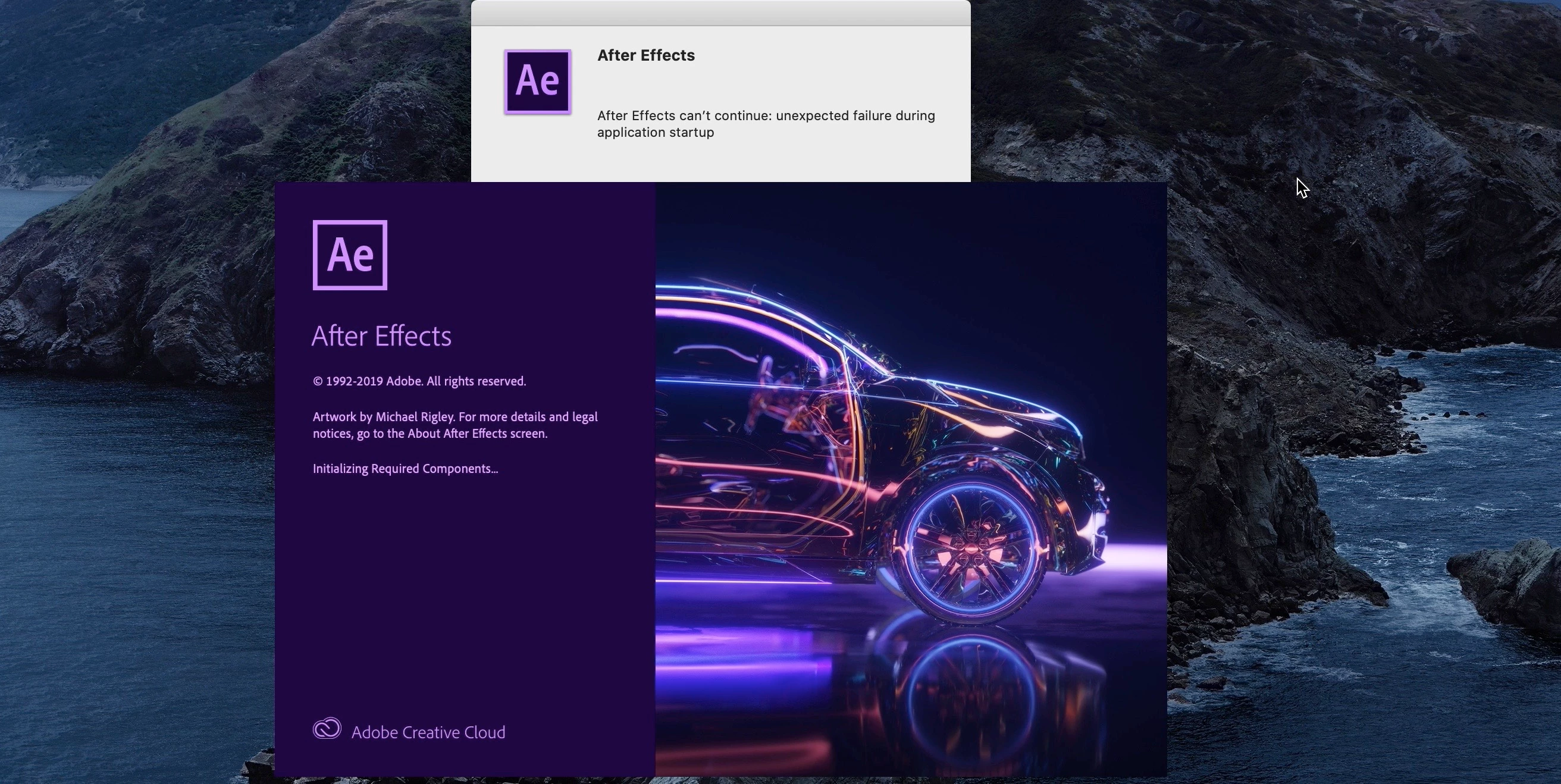
After Effects can’t continue: unexpected failure during application startup

  • December 11, 2019
  • 8 replies
  • 55481 views

Hello community,
Anybody know how to solve this ?
I am using macOS Catalina Version 10.15.2 Processor 3,6 GHz 8-Core Intel Core i9

All other's Adobe applications are loading without any issue. The only one that is throwing error is After Effect…


[Moving from generic Start/Help forum to the specific Program forum... Mod]
[To find a forum for your program please start at https://community.adobe.com/]

8 replies

Participant
July 29, 2024

You need to just upgrade Adobe After FX to the 2024 version [mine was stuck on 2022]. Abobe does not automatically upgrade AFX when you upgrade system software to Sonoma 14.5 . You might need Adobe supprt to help you through the stages, Hope this helps .


Inspiring
December 15, 2023

Very old thread, but I just had this problem: AE2024 crashed while rendering (something it had already rendered once before). Restarts didn't help, but I noticed in the Security section of 'Privacy & Security' had blocked a legacy 'Canon' format from loading. Have no idea what it is but clicked 'allow'. AE then launched fine.

Participant
October 17, 2023

I know the issue is long-standing, but I just encountered this issue for the first time. I seem to have solved it for myself, although not sure if this will help everyone. But I opened "After Effects Render Engine" which appeared as a separate icon to my After Effects when i searched in Launchpad. When I did that, it opened the render queue, but also After Effects in whole, without issue. Since then I have not reencountered the error.

Participant
October 9, 2023

This video helped me to resolve the problem

https://youtu.be/sQSvMiBknLs?si=8mqiij7tQNT6lZ5S 

Participant
September 22, 2025

What about Sequoia 15? This method won't work. Does anyone know how to solve this problem with Sequoia 15.6.1?

Participant
July 17, 2022

Hi Sajjad,

Thanks for your reply. I'm following up on the matter, I believe the issue stated above was for Mac OS, although your instructions are for Microsoft.


I followed all the above guidance from previous community helpers, but nothing works for me and After effects still can't be opened. It's urgent that I use the sotfware for a client or will loose a bulk of money I live on... I'm desperate and have tried everything.


Can you please help? 
*Screenshots of the error messages are attached.


Coline

Warren Heaton10841144
Community Expert
Community Expert
July 18, 2022

@C2O 


You're experiencing this with the current version of After Effects, correct?

There's a known issue with Catalina that's documented here:
https://helpx.adobe.com/after-effects/kb/known-issues-after-effects.html


Specifically:

May 2022 (Version 22.4) release
Issue: After Effects 22.3 and 22.4 crashes on start up when running on MacOS versions 10.15.0 through 10.15.3.
Workaround: Upgrade MacOS to 10.15.4 or above, or use After Effects 22.5 Beta, build 29 or above. For After Effects 22.5x29 and above, Transmit of DV video content over Firewire is unsupported on MacOS 10.15.0 through 10.15.3.


Participant
February 28, 2021

 I found a solution on my own I want to share it.  If you have the message Unexpected failure during application startup or After Effects warning: Could not find the user documents directory.

try to remember if when you installed the software originally you had an additional hard drive,  if that is the case connect a USB drive and start changing the letter on the drive for example from 😧 to E: and so on. It worked for me when I reached F: because I had multiple hard drives when I installed Adobe Creative Cloud in the past. I hope this helps.

Concept-Production
Inspiring
December 19, 2019

Okay guys thanks for your help I couldn’t solve the problem I had a team members online they have even taken control of my computer. They did everything they could without succeeding. 


The solution was to format my hard drive, along the way which means I lost everything. If someone still have the same issue and solve-it, please let me know we don’t know what will happen tomorrow.


Anyway the adobe team members were so nice that it was a very extraordinary experience.

Erns R.
Concept-Production
Inspiring
December 24, 2019

Hello
I am really really devastated
I don’t know what to do anymore

I formatted my computer I did install a brand-new After Effect. The first day, I run it without any issue.

This morning, when I came back to launch it, I had the same exact problem.

I really really need helps please please please.

Erns R.
Jose Panadero
Community Expert
Community Expert
December 24, 2019

Did you have any third party plugins installed? Any device attached to your iMac?

Jose Panadero
Community Expert
Community Expert
December 11, 2019

Reading the AE image it looks like something important is missing (Initializing required elements). Have you tried to uninstall and install again through teh Creative Cloud Desktop App?

Concept-Production
Inspiring
December 11, 2019

Hello Jose_Panadero,

Bless you for helping,

Yes, I did all of this and even clean my computer cashes.

Uninstall and reinstall After Effect three times.

I even removed all third part plug-ins.

I did a brand new installation from my account using Creative Cloud.

None of the above solved the issue.

Erns R.
Adobe Employee
December 16, 2019

Hi Concept-Production,


Please go to Apple Menu>System Preferences>Security & Privacy>Privacy tab>File folder access>After Effects and check if the Documents folder is checked or not. If not, then check and restart your Mac and launch Ae again.


//Vinay