
After Effects CC 2020 v17.0.2
Please help me! I did do many ways but It's not working! Thanks
Macbook pro 2018 13"
objc[3575]: Class AdobeSimpleURLSession is implemented in both /Applications/Adobe After Effects 2020/Adobe After Effects 2020.app/Contents/Frameworks/pie.framework/Versions/A/pie (0x133280540) and /Applications/Adobe After Effects 2020/Adobe After Effects 2020.app/Contents/Frameworks/cclibmanager.framework/Versions/A/cclibmanager (0x12ff373b8). One of the two will be used. Which one is undefined.
2020-03-18 15:43:15.029 After Effects[3575:174236] AdobeCrashReporterInitialize: executionTime = 0.002846 seconds
<4419118528> <AppVers> <5> App Version = 17.0.2.2x26 release
<4419118528> <AppDirs> <5> App Dir = /Applications/Adobe After Effects 2020/Adobe After Effects 2020.app/Contents
<4419118528> <AppDirs> <5> Executable Dir = /Applications/Adobe After Effects 2020/Adobe After Effects 2020.app/Contents/MacOS
<4419118528> <AppDirs> <5> Resources Dir = /Applications/Adobe After Effects 2020/Adobe After Effects 2020.app/Contents/Resources
<4419118528> <AppDirs> <5> Package Dir = /Applications/Adobe After Effects 2020
<4419118528> <AppDirs> <5> Plugin Dir = /Applications/Adobe After Effects 2020/Plug-Ins
<4419118528> <AppDirs> <5> Required Dir = /Applications/Adobe After Effects 2020/Adobe After Effects 2020.app/Contents/Required
2020-03-18 15:43:15.044 AdobeCRDaemon[3576:174247] CR dialog Preference for force quit 1
Texture memory: 1536
Vendor string: Intel Inc.
Renderer string: Intel(R) Iris(TM) Plus Graphics 655
Version string: 4.1 INTEL-12.10.12
Has NPOT support: TRUE
Max texture size: 16384
Has Framebuffer Object Extension support: TRUE
Has Shading Language support: TRUE
Started compilation of GLSL shaders
Successfully finished compilation of OGL3 shaders
Ignoring SM4.0 check for cards on mac
Return code: 3
Texture memory: 1536
dlopen "/usr/local/cuda/lib/libcuda.dylib" failed!
dlopen "/usr/local/cuda/lib/libcuda.dylib" failed!
<4419118528> <GPUManager> <2> Sniffer Result Code: 7
Texture memory: 1536
<4419118528> <GPUManager> <5> IsCUDADriverOutOfDate: 0, IsCUDAMemoryBelowThreshold: 0
<4419118528> <dvavulcansupport::VulcanInterface> <5> VulcanMessageErrorCode= 6 error type= [vulcan] Message error: AdobeIPCBroker file does not exist
<4419118528> <DynamicLink> <5> Attempting to launch dynamiclinkmanager
<4419118528> <DynamicLink> <5> /Applications/Adobe After Effects 2020/Adobe After Effects 2020.app/Contents/dynamiclinkmanager.app
<4419118528> <DynamicLink> <5> Increase wait time to 2
<4419118528> <DS> <5> GPUSniffer launching with test mask 254
<4419118528> <DS> <5> GPU Sniffer Output:
GPUSniffer testing 254
Initializing GPU Tech:
Try CUDA: 1
Try OpenCL: 1
Try Metal: 1
Try Vulkan: 1
KernelLoadAction: 0
UseOpenGLContext: 0x0
UseDeviceContext: 0x0
UseD3D11Context: 0x0
No CUDA devices Found
OpenCL system device count: 1
Found OpenCL device Name: Intel(R) Iris(TM) Plus Graphics 655 supportsSSG: 0
No capability restrictions detected - adding device to list
Metal system device count: 1
Found Metal device index: 0 Name: Intel(R) Iris(TM) Plus Graphics 655
No capability restrictions detected - adding device to list
Finished gpu initialization in 0 ms
--- OpenGL Info ---
Vendor: Intel Inc.
Renderer: Intel(R) Iris(TM) Plus Graphics 655
OpenGL Version: 2.1 INTEL-12.10.12
GLSL Version: 1.20
Monitors: 1
Monitor 0 properties -
Size: (0, 0, 1440, 900)
Max texture size: 16384
Supports non-power of two: 1
Shaders 444: 1
Shaders 422: 1
Shaders 420: 1
--- GPU Computation Info ---
Found 2 devices supporting GPU computation.
OpenCL Device 0 -
Name: Intel(R) Iris(TM) Plus Graphics 655
Vendor: Intel (Apple platform)
Capability: 1.2
Driver: 1.2
Total Video Memory: 1536MB
Metal Device 1 -
Name: Intel(R) Iris(TM) Plus Graphics 655
Vendor: Intel (Apple platform)
Capability: 10000
Driver: 0
Total Video Memory: 1536MB
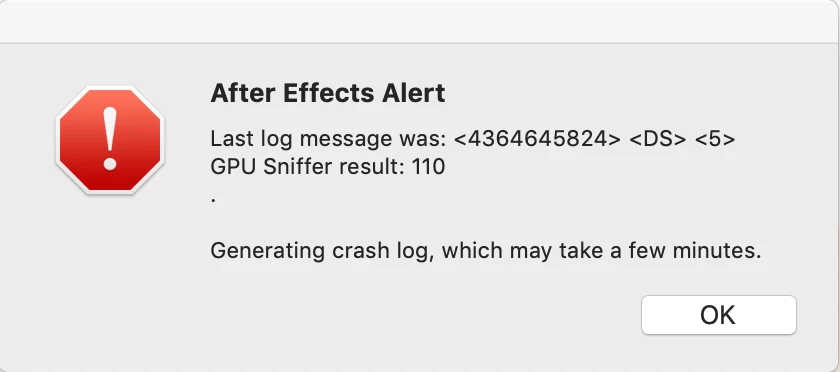
<4419118528> <DS> <5> GPU Sniffer result: 110
CoreData: annotation: Failed to load optimized model at path '/Library/Frameworks/FxCore.framework/Versions/A/Resources/FxCorePersistentDocument.momd/FxCorePersistentDocument.omo'
Bus error: 10


 AdChoices