


amhouses
Participant
May 23, 2026
Answered

After Effects closing soon after opening and crashing issue

  • May 23, 2026
  • 3 replies
  • 26 views

I have recently got my pc fixed, and After Effects was working fine but clicking on "clear cache" when I had low storage is when the crashing problems started.


I had my SATA cable changed, and my memory is working fine with the AF files backed up and collected


- AE is up to date

- I have Windows 10 on a custom build

- 16 GB of RAM

- 172+ GB of storage


What I have done:

- uninstalled and reinstalled After Effects

- disabled "Enable Compressed Frames (Lossless)"

- restarted pc and ran AF in safe mode (didn't change anything as I don't have any third-party plugins)


I had different types of issues, some being.

-Sometimes I hear 4 rapid beeps that start quiter and grow louder, then don't see any problems until it suddenly closes after less than a minute

Are the 4 beeps a warning message? I haven't heard it before, and now I hear it while having these issues every time I start AF

-I hear 4 rapid beeps, then my monitor screen turns black temporarily
turns back on, then the error "After Effects can't
continue: encountered a GPU or graphics driver issue," then it stopped responding."

-The error only occurs in After Effects and Premiere Pro and does not
happen on anything else, so it's not a computer issue

-When running After Effects with the internet turned off, I also got the error
message, "after effects warning: direct 2d drawbot error - dxgi gpu device
The instance has been suspended due to removal. HRESULT: -2005270523"

The most common issue that happens most times and doesn't let me use AF is the sudden closing in less than a minute

specs-

CPU
Intel Core i7 9700K @ 3.60GHz 47 °C
Coffee Lake 14nm Technology

RAM
16.0GB Dual-Channel DDR4 @ 1600MHz (16-18-18-36)

Motherboard
Micro-Star International Co., Ltd. MPG Z390 GAMING PLUS (MS-7B51) (U3E1)

Graphics
Y25-25 (1920x1080@240Hz)
8192MB ATI Radeon RX 580 Series (XFX Pine Group) (55 °C at the time of the random closing

Storage
931GB Samsung SSD 860 EVO 1TB (SATA (SSD))
1862GB Western Digital WD My Passport 2626 USB Device (USB (SATA) (SSD))

I was in the middle of working on an edit, and I would greatly appreciate any support on these issues
screenshots will be posted below
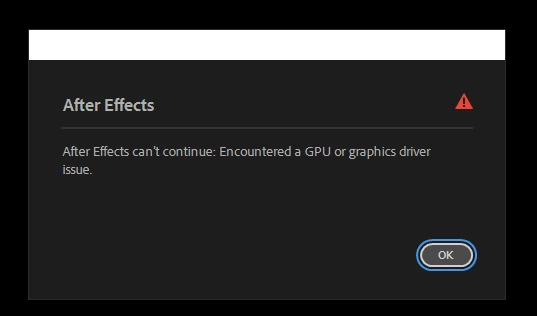
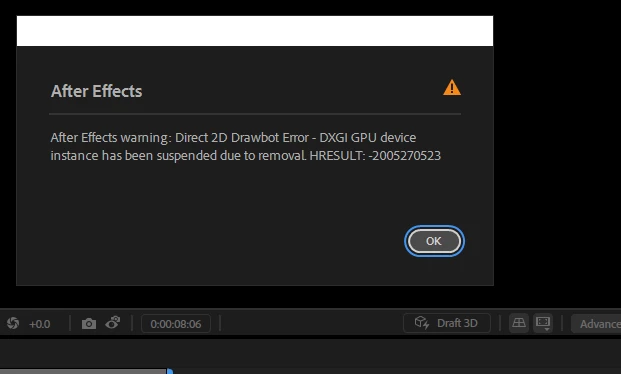
Again, the most common issue is just closing.

Correct answer RobShultz

Please make sure that your GPU Drivers are up to date.

3 replies

RobShultzCommunity ExpertCorrect answer
Community Expert
May 24, 2026

Please make sure that your GPU Drivers are up to date.

amhouses
amhousesAuthor
Participant
May 25, 2026

thank you nga it worked ❤️

Nishu Kushwaha
Community Manager
Community Manager
May 25, 2026

So glad to hear it worked, amhouses and thanks RobShultz for the quick assist!

Feel free to reach out if there are any other questions.


Thanks,

Nishu
 

amhouses
amhousesAuthor
Participant
May 23, 2026

correction I clicked disable third party plugins in reset options when opening premier pro after getting my pc back


amhouses
amhousesAuthor
Participant
May 23, 2026

Hey All, 


I have recently got my pc fixed and after effects was working fine but after clicking on "clear cache" when low on storage is when crashing problems started

 
I had my SATA cable changed, and my memory is working fine with the AF files backed up and collected


- AE is up to date

- I have a windows 10 on a custom build

- 16 GB of RAM

- 172+ GB of storage


What I have done:

- uninstalled and reinstalled after effects

- disabled "Enable Compressed Frames (Lossless)"

- restarted pc and ran AF in safe mode (didn't change anything as i dont have any third party plugins)


-sometimes i hear 4 rapid beeps and dont see any problems until it suddenly closes after only about 10-30 seconds

is the 4 beeps some warning message? i havent heart it before and now i hear it while having these issues every time i start AF

-i hear 4 rapid beeps, then my monitor screen turns black temporarily
turns back on then error "after effects can't
continue: encountered a GPU or graphics driver issue" then it stopped responding"

-the error only occurs on after effects and premier pro and dose not 
happen on anything else so its not a computer issue

-when running after effects with internet turned off i also got the error
 message, "after effects warning: direct 2d drawbot error - dxgi gpu device
instance has been suspended due to removal. HRESULT: -2005270523"

the most common issue by far that makes it unusable due to happening every time is the 4 beeps and then suddenly closing after less than a minute


specs-

CPU
    Intel Core i7 9700K @ 3.60GHz    47 °C
    Coffee Lake 14nm Technology

RAM
    16.0GB Dual-Channel DDR4 @ 1600MHz (16-18-18-36)

Motherboard
    Micro-Star International Co., Ltd. MPG Z390 GAMING PLUS (MS-7B51) (U3E1)    

Graphics
    Y25-25 (1920x1080@240Hz)
    8192MB ATI Radeon RX 580 Series (XFX Pine Group)    (55 °C at the time of the random closing

Storage
    931GB Samsung SSD 860 EVO 1TB (SATA (SSD))    
    1862GB Western Digital WD My Passport 2626 USB Device (USB (SATA) (SSD))    

I was in the middle of working on a edit and i would greatly appreciate any support on these issues 
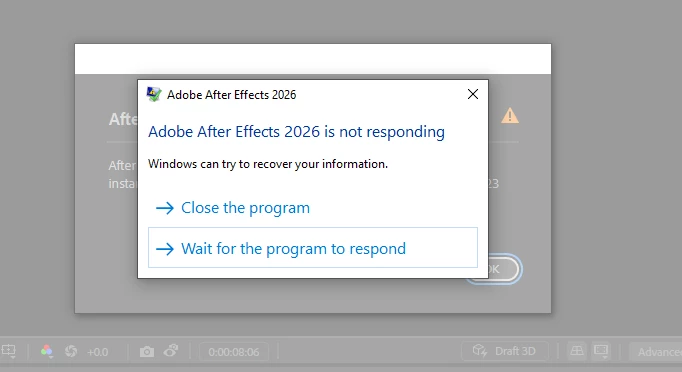
screenshots will be posted below
 

Nishu Kushwaha
Community Manager
Community Manager
May 25, 2026

Duplicate thread merged.


Thanks,

Nishu