
Participant
February 9, 2022
Answered

After Effects Content-aware relative path error

  • February 9, 2022
  • 3 replies
  • 1105 views

Hi there, 


I am facing an error as i attempt to use content aware on a video and i could not find any solution. its like the error doesn't even exist on google. I get the same error if i attempt to Create reference frame or Generate fill layer
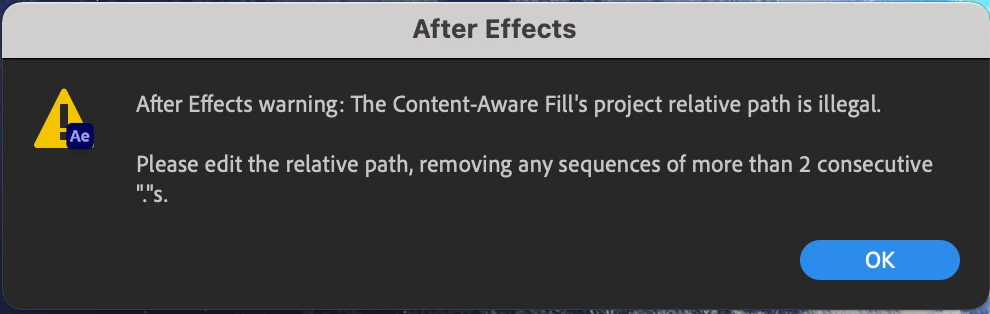
 

Pressing OK promts this next screen which i have no idea what it means and either options does nothing.
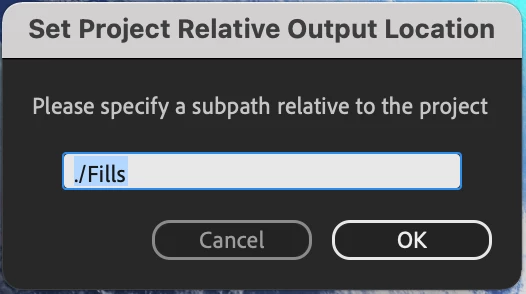
 

So far I attemted restarting the Mac, AE, and the whole project. no clue on what's causing it.


I am using an iMac (Retina 5K, 27-inch, 2020) on Big Sur

After Effects build 22.0

This topic has been closed for replies.
Correct answer Mylenium

Fair enough, but then perhaps that is the problem here: Your folder structures are too deep and AE can't add one more level to store the fill data. This may also extend to AE's virtual file paths created for the caches and temp files. If so, try just the opposite: Create a fresh folder on your storage volume's root level and save there. Other than that of course it may simply be necessary to do a little housekeeping and clean out caches and temp data that may have accumulated over time from previous projects.


Mylenium

3 replies

Mylenium
MyleniumCorrect answer
Legend
February 9, 2022

Fair enough, but then perhaps that is the problem here: Your folder structures are too deep and AE can't add one more level to store the fill data. This may also extend to AE's virtual file paths created for the caches and temp files. If so, try just the opposite: Create a fresh folder on your storage volume's root level and save there. Other than that of course it may simply be necessary to do a little housekeeping and clean out caches and temp data that may have accumulated over time from previous projects.


Mylenium

Code264Author
Participant
February 9, 2022

You know what, that actually worked, and I was just gonna do it for argument sake, did not think it would.


Thank you very much,

Mylenium
Legend
February 9, 2022

Start by not saving your project file plainly on the desktop. Create a sub-folder or store it in a different location.


Mylenium

Code264Author
Participant
February 9, 2022

"save location is in subfolders in the desktop"

It is not randomly thrown in the desktop. It's within multple subfolders that contain most of my project files each organized per project per year. I am aware having a clean and proper structure to my files is essensial, which is why i mentioned its confusing that the save location would cause any issues

Mylenium
Legend
February 9, 2022

The error pretty much states what's wrong, so I'm not sure what you actualyl having issues with, especially since you haven't provided any info about actual save locations or things like your temp and cache folders. No doubt something is wrong there that throws the CAF for a loop, which could be anything to an actual misnomer to mundane permissions issues. Either way, you have to provide more specific info.


Mylenium

Code264Author
Participant
February 9, 2022

hey Mylenium, 


sorry for not providing more info, I just dont understand what the error even is, I dont know what is "relative path" referring to, so I was not sure what info I needed to provide.

save location is in subfolders in the desktop (not sure how this can cause an issue)

cache files are in the defualt location which I believe is /library/caches.


if you kindly could let me know what sort of info is needed as again, I am clueless on what the origin of the error is. 


Thanks,