
Inspiring
September 16, 2019
Question

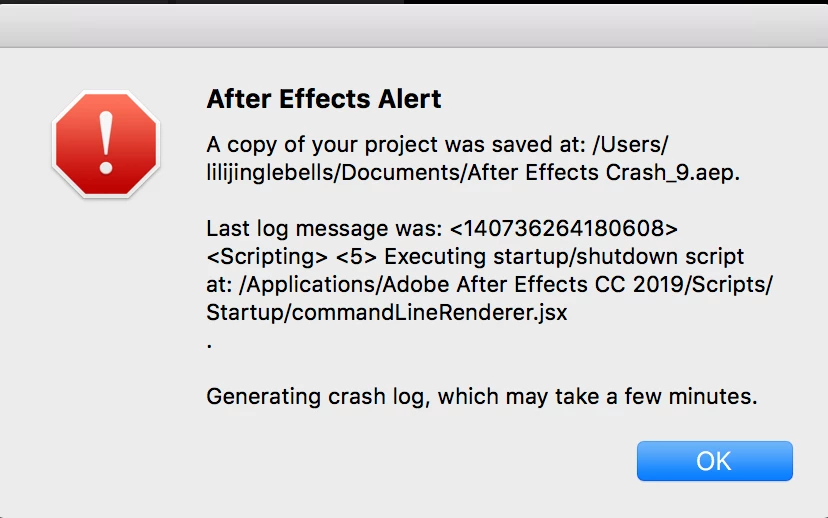
After Effects could not launch - alert saying 'a copy of your project was saved at:....'

  • September 16, 2019
  • 2 replies
  • 4482 views

Hi,


I could not open my After Effects. The message below always pops up when I try to open AE. Can someone help me please? Many thanks in advance.


I've tried uninstalling the app and re-downloading it.
 

    This topic has been closed for replies.

    2 replies

    Martin_Ritter
    Legend
    September 16, 2019

    That is odd! AE tries to tun the text file, but it isn't a script.

    Remove both files, so that the folder is all empty (I would not delete them, just put them to another place). Report back.


    *Martin

    happililyAuthor
    Inspiring
    September 16, 2019

    Hey Martin, thanks again.


    I've moved it to other folders, but didn't seem to work. The new alert message is attached below. 


    I've also deleted the 'After Effects Crash.aep' files in my 'Document' folder. But didn't work either.


    Also, I just realised there is one AE folder in the 'Application' folder and one in the 'Document' folder. I deleted everything in the 'Document' folder and uninstalled it again. Still didn't work. Really don't know what to do now... Just wondering do I need to move the 'script' files back to the original folder?  Thanks! '

    Participant
    July 30, 2024

    hi! any news on this?
    im having the same issue 😕😕

    Martin_Ritter
    Legend
    September 16, 2019

    It seems that there is a startup script "commandLineRenderer.jsx" which causes trouble.

    Go to the path and remove the script from there. Report back, it this helps.


    *Martin

    happililyAuthor
    Inspiring
    September 16, 2019

    Hi Martin,


    Thank you for your help.


    I tried to delete the file you mentioned and opened AE again- the windows are launched for a few seconds and shut down again.


    It shows things like below and I've also included the Startup script text below as well. Do you know if I can do anything else to solve this issue? Many thanks!


    Best,

    Lijing