


Participant
August 19, 2021
Answered

After Effects could not show layers of Ai file

  • August 19, 2021
  • 3 replies
  • 7309 views

I am importing an AI file that contains layers into After Effects I get the new Comp and I see just one AI file icon. I can't figure out why my layers are not coming in. 
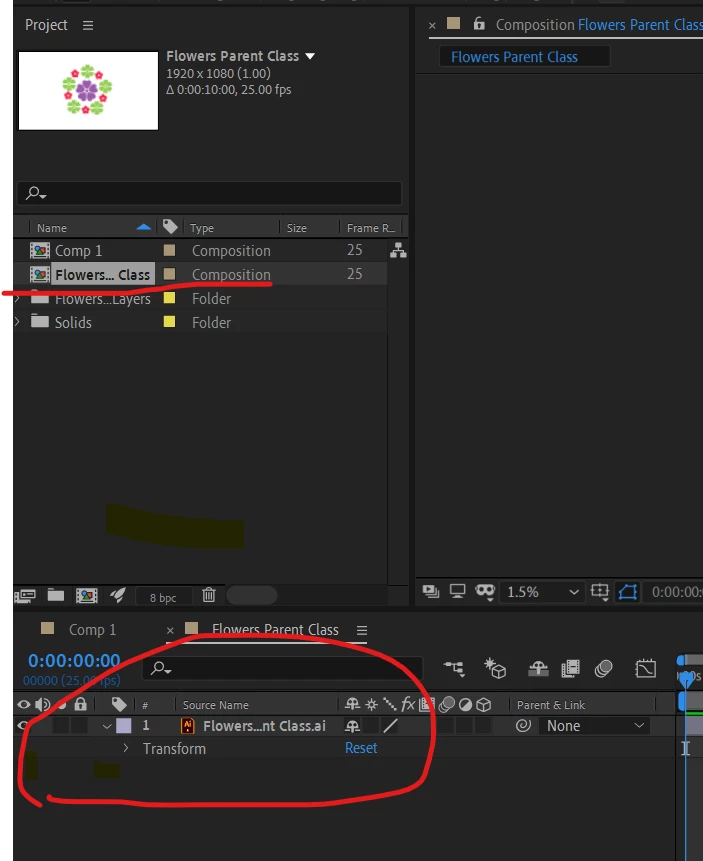


I want all this layers of Ai as shown below :
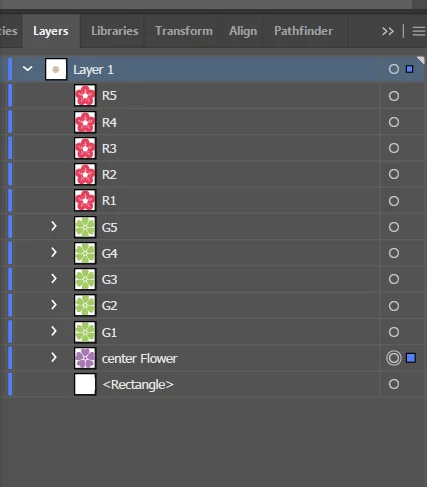
Anyone got some ideas?


    This topic has been closed for replies.
    Correct answer Rick Gerard

    Maybe this will help. I clearly show how to separate objects into layers and then import the AI file as a composition. The design may have nothing to do with your project but the workflow does.


    3 replies

    Rick GerardCommunity ExpertCorrect answer
    Community Expert
    August 19, 2021

    Maybe this will help. I clearly show how to separate objects into layers and then import the AI file as a composition. The design may have nothing to do with your project but the workflow does.


    Participant
    August 19, 2021

    Thank you Sir for this workflow now it's working on my project. 

    Andrew Yoole
    Inspiring
    August 19, 2021

    You can see that all the elements in your Illustrator file are contained within one layer - Layer 1.  The elements aren't layers.


    You need to seperate each element into individual Illustrator layers before you import to AE.  


    Select your layer in the layer window, and use the layer menu to choose "Release to layers". 


    Participant
    August 19, 2021

    Thank you Sir,

         I did the changes as per your instructions, but still same problem facing. Could you please help me for what to do next? 


    LinSims
    Community Expert
    Community Expert
    August 19, 2021

    Let me move this to the After Effects forum for you, which is the appropriate forum for your question.

    The Using the Community forum is for help in using the Adobe Support Community forums, not for help with specific programs. Product questions should be posted in the associated product community.