
Saikex
Participant
June 19, 2022
Question

After Effects CS5.5 - Audio Problems (Spacebar, no green bar)

  • June 19, 2022
  • 1 reply
  • 669 views

Hi, this is my first time posting on the After Effects forum. I'm using the older AE CS5.5. Support is incredibly limited, I understand folks. However, for those of you who have this version or experience using it, perhaps you may know how to fix this particular issue?


In the timeline, my audio file (.m4a) is not rendering. I'm not seeing the green bar loading. When I hit the Spacebar, the Time Indicator will start to move, but there isn't any playback. From my understanding, the green bar represents the file being rendered in the RAM.


HARDWARE:

My machine hosts 32GB RAM and has an i7 Intel CPU with an NVIDIA Graphics Card. It's still pretty effective for most of the work I do. The Audio Hardware output is configured to some Bose Speakers for playback.


SETTINGS:

The Preview panel is visible. The sound isn't muted.
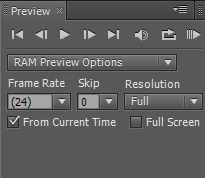
Otherwise, I know the sound does work. If I press the "0" on the numpad, it will successfully playback sound. But if I hit the "0" to pause and then hit it again to play, it will always play back from where the Time Indicator was originally placed. I don't mind using it this way. It's just a little cumbersome.


Is there a way to configure AE CS5.5 to render Preview automatically without my input? That way I can just use the Spacebar again to Play and Pause at will without issue. I'd rather not have to use the "0" keystroke.

This topic has been closed for replies.

1 reply

Jqke
Legend
June 19, 2022

Yeah, the 0 key is the RAM preview option. Unfortunately in versions before 13.7, the only way to playback video in real-time with audio at the same time was with RAM previews. For some reason, people who used AE years ago didn't want to hear the audio at the same time while they were making their animation, so RAM previews helped them when they wanted to render the whole thing.


You can try to "hear" the audio by going to Edit > Preferences > Previews and uncheck "Mute Audio When Preview Is Not Real-time", but it will probably won't really work.


I don't know much about older versions since I've personally never used them..but I have heard stories like this one. So please let me know if this helps! 🙂

~Jake
Saikex
SaikexAuthor
Participant
June 19, 2022

Thanks for the heads up. Bummer, that's really inefficient. I also checked out your advice. From a quick Google search, the "Mute Audio When Preview Is Not Real-Time" setting seems to only be available from AE CC ver13.5 and later.


The only alternative I have found is that I can use the "0" to start the sequence, Spacebar to pause, and then hit "0" again to resume where it last left off. It's cumbersome, but it's better than nothing. Unless anyone knows if there's a way to reprogram the keystrokes (or change the way "0" behaves), then I'm afraid this will be the only way I can make AE CS5.5 work for what I need it to do.


Just to verify the audio design choice in AE CS5.5 is the issue, I imported a video file with sound. Hitting the Spacebar only plays the footage in AE CS5.5. But hitting the "0" plays the footage and sound. Yeah... that's just how AE CS5.5 works unfortunately.

Jqke
Legend
June 19, 2022

Oh my bad, I didn't know CS5.5 doesn't have that option :P. But yeah that's one of the only reasons in my opinion why the newer versions are ahead of the older versions.


Not sure if you can do this with a version prior to 13.0, or if the RAM preview shortcut key is listed here, but the shortcut keys are located in:


Windows: C:\Users\[user_name]\AppData\Roaming\Adobe\After Effects\10.5\Adobe After Effects 10.5 Win en_US.txt


Mac: /Users/[user_name]/Library/Preferences/Adobe/After Effects/10.5\Adobe After Effects 10.5 Win en_US.txt

~Jake