

Jonah Lee Walker
Inspiring
May 2, 2010
Question

After Effects CS5 Mac crashes on launch with a warning

  • May 2, 2010
  • 5 replies
  • 29002 views

I get the following error message: After Effects Warning: Could not rename the file '/Users/jonahlee/Library?Preferences/Adobe/After Effects/10.0/Worspaces.9216.1407350837851841.xml' to workspaces.xml'.
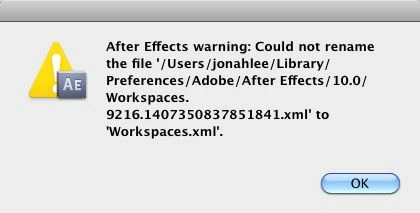
The strange thing is that the file does not seem to exist. I even checked that directory with the terminal. I have run permissions and restarted, and I am still getting this message. Anyone hae any ideas.

My computer is a MacPro 2 x 2.26 GHz Quad-Core Interl Xeon with 16 GB of 1066 MHz DDR3 Ram running 10.6.3 so that should not be an issue.

    This topic has been closed for replies.

    5 replies

    Climberfx
    Known Participant
    April 12, 2012

    The fuc.... Flip for Mac was the guilt one. I remove it from quicktime plugin, and voila! All works again. But i keep me asking why this happen after a long time using it without problems?

    Participant
    June 1, 2010

    i had the same problem with After Effects CS5 AND Flash Pro CS5

    and attempted to fix it all day to no avail.

    BUT

    i finally got it fixed when i upgraded my Mac software, which was Mac OS X Leopard 10.5.8, to Mac OS X Snow Leopard 10.6.3 (:

    it's only $30 at the Apple Store.

    Hope this helps someone!!

    Participant
    May 10, 2010

    I was having the same issue. I deleted the Workspace.xml and everything started as usual. I am using 2 monitors and I'm wondering if that may have something to do with it... The default workspace I had set up spanned across both monitors...

    Todd_Kopriva
    Inspiring
    May 2, 2010

    Try deleting the workspaces XML file here:

    <drive>/Users/<username>/Library/Preferences/Adobe/After  Effects/10.0

    If After Effects is failing when it tries to rename that file, this might help. The workspaces file is a preferences file that will be rebuilt to the default state if there isn't a file present.

    Here's a post about a problem that may be similar, and the steps to addressing it might be similar.

    Jonah Lee Walker
    Inspiring
    May 2, 2010

    Thanks. Actually the file it was saying did not exist, but I trashed the whole folder for 10 and then it booted, except for this error message about quicktime again, which is installed. And because of this, it basically does not function, because it won't open any Quicktime video.

    And the Dynamiclinkmanager crashed again as well.

    - Jonah Lee WalkerVideo Editor, Colorist, Motion Graphics Artist
    Todd_Kopriva
    Inspiring
    May 2, 2010

    When you say "QuickTime is installed", what do you mean? QuickTime X, QuickTime 7.4? QuickTime 7.6? Details lilke this are helpful for troubleshooting.

    I recommend installing QuickTime 7, which is an optional installation for Snow Leopard (Mac OSX v10.6.x). QuickTime X doesn't provide a lot of features that video professionals need and rely on; QuickTime 7 does.

    Jonah Lee Walker
    Inspiring
    May 2, 2010

    I have restarted 3 times, and fixed permission 3 times and that has not helped.

    I tried running it with Psuedo, so it is runnign with root permissions, and I got the error that the dynamiclinkmanager quite unexpectedle, and it gave me an error message about quicktime not being installed on the system, but seemed to boot anyway.

    - Jonah Lee WalkerVideo Editor, Colorist, Motion Graphics Artist