Participant
September 16, 2020
Question

After Effects detects .mp4 h264 as AVI

  • September 16, 2020
  • 2 replies
  • 2288 views

So I have some videofiles that are detected as mp4 by Windows and Video Editing Software such as Nuke.

In spite of that, when I import them into AE, they are interpreted as AVI, even though in the video properties in After it says they are encoded in H264.
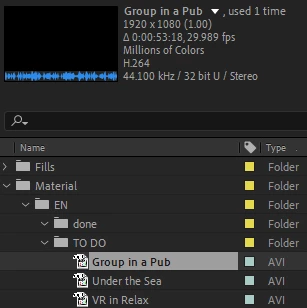
How can I solve this? It's giving me preview errors because of this.


Thank you!

This topic has been closed for replies.

2 replies

Participant
June 17, 2021

For me it was solved by going to file->project settings->Video Rendering and Effects(tab) then select mercury software only and hit save.

Now try to re-import the video file.

 Youtube Video 

Vishu_Aggarwal
Participating Frequently
September 16, 2020

Open the video in VLC player and see the format details. You can also try unchecking the following option in AE Preferences > Import > video footage (Enable hardware-accelerated decoding).

Vishu AggarwalAdobe Certified Instructor, Professional and Expert
Participant
September 17, 2020

Thanks for your reply!


VLC recognizes it as an mp4:

Same with Adobe Premiere:


I have deactivated the hardware-accelerated decoding but it didn't help. The playback issue that I'm having is a weird frame in between, a problem that I do not have when playing the video with VLC or editing it with Premiere.