
Participating Frequently
May 5, 2018
Answered

After Effects eraser tool time information?

  • May 5, 2018
  • 2 replies
  • 2343 views

Hello Everyone!I
I'm wondering about one thing about the eraser tool.
Situation like on attached video:
1.Turn on eraser tool.
2.Press mouse button and hold it and erasing in various mouse speed movement... Quick moves...Then stop for a while... Then again fast moves and keep holding left mouse button from the beginning to the end.
3.Then put 2 keyframes... One on 0 and second one on 100 on EFFECT/PAINT/ERASER/END
4.When hit play button eraser repeats exactly same path ALONG WITH TEMPO CHANGES!
5.CTRL+C on EFFECT/PAINT/ERASER/PATH
6.Create some new shape layer (it can be some little circle) and CTRL+V on this layer POSITION

7.Changing duration of shape layer keyframes to same duration as from step number 3.

8.When hit play again shape (little circle) is moving along the same path as eraser but without tempo changes.
And my questions are:
Where the tempo changes of eraser tool are saved/written?
How to make this little circle (shape layer) moving not just the same path as eraser but also with the same tempo changes without manual manipulation to every single keyframe?
    This topic has been closed for replies.
    Correct answer Roei Tzoref

    this is how I would do it:

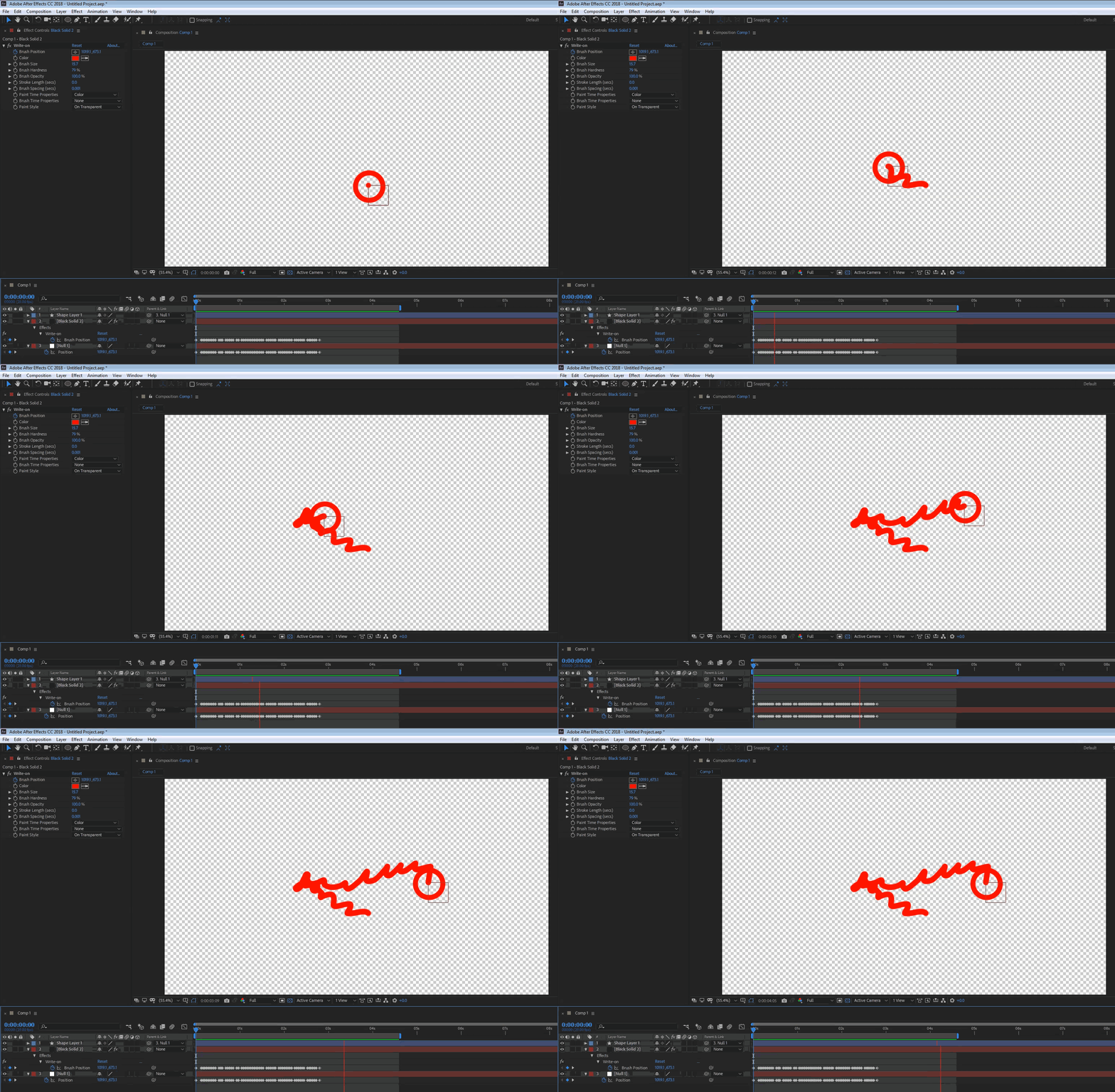
    1. create a null layer and open the motion sketch window

    2. record the movement

    3. create a solid layer

    4. apply the write-on effect to the solid layer

    5. copy the position keyframes from the null and paste to the position keyframes of the write-on effect (or link one to another using the expression pick whip)

    6. set the parameters of the write on to fit you needs. you can easily make the drawing a matte in a variety of ways

    you now have a path that is drawn in the exact timing of the motion sketch keyframes of the null. if you have and element you want to add to that movement, simply make the null its parent.

    2 replies

    Roei Tzoref
    Legend
    May 6, 2018

    The pattern (timing or velocity) of the paint tools are embedded in the keyframes and there is no way to access it. this is a limitation with all the recordings of all the paint tools.

    Participating Frequently
    May 6, 2018

    Thank You Roei Tzoref!

    Roei Tzoref
    Roei TzorefCorrect answer
    Legend
    May 6, 2018

    this is how I would do it:

    1. create a null layer and open the motion sketch window

    2. record the movement

    3. create a solid layer

    4. apply the write-on effect to the solid layer

    5. copy the position keyframes from the null and paste to the position keyframes of the write-on effect (or link one to another using the expression pick whip)

    6. set the parameters of the write on to fit you needs. you can easily make the drawing a matte in a variety of ways

    you now have a path that is drawn in the exact timing of the motion sketch keyframes of the null. if you have and element you want to add to that movement, simply make the null its parent.

    Roland Kahlenberg
    Legend
    May 6, 2018

    What effect are you trying to achieve? There is a strong possibility for better techniques than the one you are using.

    I know of no way to access the speed of the Paint Tool's brush strokes.

    Very Advanced After Effects Training | Adaptive & Responsive Toolkits | Intelligent Design Assets (IDAs) | MoGraph Design System DEV
    Participating Frequently
    May 6, 2018

    Hi Roland Kahlenberg,
    Thank you for your interest in my problem.

    I am trying to achieve effect of erasing multiple pictures by little funny character. And because this is multiple pictures I am searching way to not doing it manually frame by frame.

    So I need to character object follows exactly path of eraser (and this is no problem) but the problem is to make it exactly with the same tempo changes as the eraser is doing. Making it with various tempo is crucial for funny look of whole project.
    So attached video shows the essence of the problem in very simple way: I need to make object follows eraser point/brush in exactly same path and speed.
    I hope i explained it well

    Roland Kahlenberg
    Legend
    May 6, 2018

    Select and Copy the keyframes for the Stroke Option's End property. Move the Timeline Indicator a little after the last keyframe of the End property. Select the Stroke Option's Start property, and paste the keyframes you just copied. Scrub the Timeline Indicator. Laugh at how silly this world can be, at times. Come back here to thank me and the rest of the world. Get back to work while trying to wipe the smile off your face.
    :-)

    Very Advanced After Effects Training | Adaptive & Responsive Toolkits | Intelligent Design Assets (IDAs) | MoGraph Design System DEV