

raghavg6463409
Known Participant
Jan 4, 2020 7:12 AM UTC
Question

After Effects error 37:66

Anyone Help Me Out from this 

Trying to edit template in after effect but showing this everytime
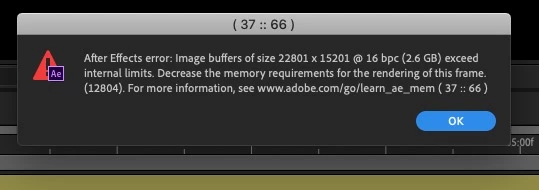


13 replies

Participant
Feb 4, 2025 4:25 PM UTC

Hola, a mí me pasó lo mismo, y tuve que bajar la profundidad de color de 32 bpc a 16 bpc y ya no me salía ese error. Espero le ayude a alguien por aquí. Saludos.


Translate
Participant
Nov 5, 2024 8:09 AM UTC

Please decrease the output width and output height numbers of the "Motion Tile" effect

Translate
Participant
Aug 18, 2023 3:28 PM UTC

Check whether you have used the effect ' motion title ' . Decrease it may solve this issue.

Translate
Mylenium
Legend
Jan 4, 2023 7:20 AM UTC

Without any info about your system we can't realyl tell you much. If it works with one resolution, but not the other the most likely cause simply is that your GPU acceleration does not have enough resources, so switch to software-only encoding. anything more will require better info.


Mylenium

Translate
marcobrun24
Participant
Jan 4, 2023 1:51 AM UTC

Hola que tal, algo de ayuda les puede servir: El proyecto que hacia estaba en 4k y me salía este error, por lo cual lo tuve que bajar a 2k o 1080 y asi pude solucionar este error, al momento de renderizar y guardar el video con el Encoder a 4k, 2k o la misma resolución de origen en mp4 H.264, espero les haya servido de algo, saludos a todos...

Translate
Participant
Sep 29, 2021 12:07 AM UTC

Hi I actually have the same problem... you know how can I fix it? 

Translate
Mylenium
Legend
Jan 4, 2020 8:55 AM UTC

Without any idea about what the project actually contains, nobody can tell you much. Start by opening the project with capslock enabled and disabling the effects selectively until you find the culprit.


Mylenium

Translate
Participant
Aug 24, 2020 9:19 AM UTC

Hi. I managed to find the culprit layer. Any suggestions on what to do next?  

Translate
Community Expert
Aug 24, 2020 11:25 AM UTC

Specific recommendations are impossible if we don't know what is going on in the comp. The layer is too big, you have applied an effect that has caused a problem with the size of the layer, you have customized a comp setting or about 40 other things I can think of right of the top of my head. No details, no screenshot, showing the modified properties of the problem layer = nothing but a wild guess.

Translate
