

Participant
December 21, 2019
Question

After effects Error: adding color to side of 3D circle

  • December 21, 2019
  • 2 replies
  • 1280 views

Hello, straight to the error

made Shape layer > made Ellipse
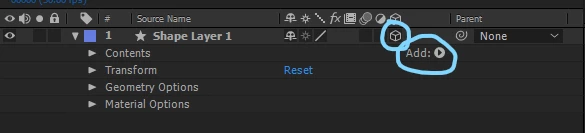
 

While adding effect of Side Color...



I'm getting follow warning...



Can anyone help, please...

2 replies

Community Expert
December 14, 2023

You must have at least one of the contents/objects selected to add anything to a shape layer with the add menu. 


  1. Press the u key twice to show all modified properties of the shape layer
  2. Select the shape (your ellipse) you want to add something to
  3. Choose the Add menu and choose the effect you want (Edge Color)
  4. Make sure the Shape layer is extruded (C4D or Advanced 3D rendering only for Edge Color)


If you have multiple shapes in a group, you can select the Group and add the Shape Layer effect you want. It's all a matter of rendering order. Nothing will happen if you add an edge color above an empty group or empty Shape Layer/Contents/Shape. To do anything, it must be in the same content folder below a path or parametric shape.


OussK
Community Expert
Community Expert
December 21, 2019

Follow the instruction, add empty group than add side color,

Participant
December 13, 2023

I added the shape to the group but the color still won't show up on the shape. Any idea would help.