


Known Participant
January 2, 2023
Question

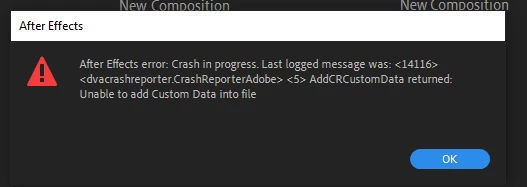
after effects error crash in progress

  • January 2, 2023
  • 4 replies
  • 1923 views

this happens every time I open After Effects no matter what version is installed.
I’ve done a complete reinstallation of the programme, tried to reset disk cache but still cannot get the application to work.
 

This topic has been closed for replies.

4 replies

Mylenium
Legend
January 3, 2023

Clean out the existing crash reports in your Adobe folders. Perhaps one of them is borked and messes up things.


Mylenium

Brandon5Author
Known Participant
January 4, 2023

Just cleaned out the cash reports and removed the after effects 2023 folder from my documents but still have the same issue.

nishu_kush
Community Manager
Community Manager
January 12, 2023

Sorry for the delayed response, Brandon.

Have you installed any third-party plug-ins? Can you try removing them and see if that helps? Also, do you see the Submit Crash dialog after the crash? If you do, provide your email id and submit the crash report so that we can find it in our system.

Let us know.


Thanks,

Nishu

Mylenium
Legend
January 3, 2023

Without any system info we can't realyl tell you much, but the message is already telling you what's happening: The Adobe Crash reporter itself is crashing, which usualyl indicates that it is being blocked by some security setting or tool on your system liek a virus scanner. So start by checking these things. Anything more will require better info.


Mylenium

Brandon5Author
Known Participant
January 3, 2023

my spesifications are
Processor AMD Ryzen 7 5800X 8-Core 3.80 GHZ


GPU NVIDIA GeForce RTX 3070


RAM 32GB

ive had to downgrade to After Effects 2020 in order to get it to open but any of the modern versions give me the same error.

as far as I'm aware I don't have any strict firewall settings or anti virus enabled. 

nishu_kush
Community Manager
Community Manager
January 3, 2023

Hi brandon5CDC,


Sorry for the crash. Please share the following details so that we troubleshoot the issue properly.

  • How do you launch After Effects? Do you double-click a project file to click its icon?
  • What are your system specifications (CPU, GPU, RAM, OS version)?
  • Have you tried resetting the preferences of After Effects?
  • Do you see any crash reports?

Let us know, we're here to help.


Thanks,

Nishu

Brandon5Author
Known Participant
January 3, 2023

Thank you for the response, i usually launch After Effects through the start menu or the icon.

my spesifications are
Processor AMD Ryzen 7 5800X 8-Core 3.80 GHZ


GPU NVIDIA GeForce RTX 3070


RAM 32GB


I did reset the preferences but did not not have a effect.


I don’t see any crash reports

Brandon5Author
Known Participant
January 2, 2023

this window then comes up after that one