
April 10, 2018
Question

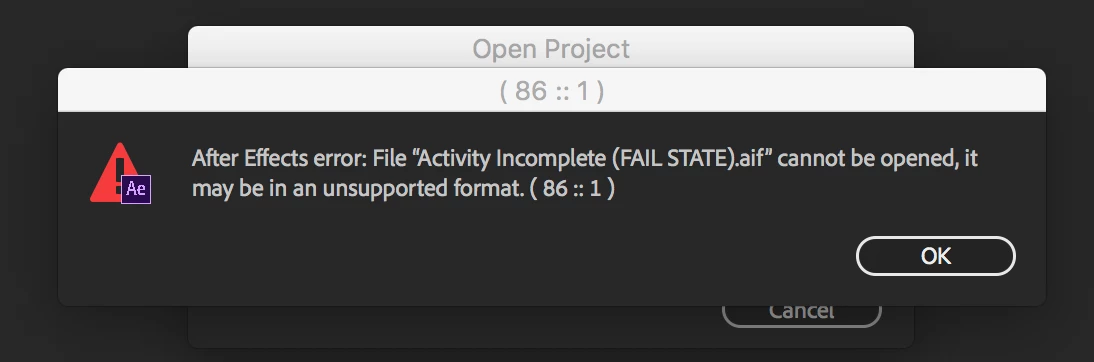
After Effects error: File "(filename).aif" cannot be opened, it may be in an unsupported format. ( 86 :: 1 )

  • April 10, 2018
  • 6 replies
  • 3864 views

Issue: After updating to 15.10, After Effects stopped recognizing .aif files (see image).

Error message when opening any project with .aif files in them: After Effects error: File "(filename).aif" cannot be opened, it may be in an unsupported format. ( 86 :: 1 )

-For clarity, this happens on all audio files in any of my projects, not just the one in the screenshot.

-Replacing the files via Replace Footage does not solve this issue - it won't recognize any of the replaced audio files either, you get the same error.

-Reboot does not solve this issue.

-Uninstall / Reinstall (with removing preferences chosen) does not solve this issue.

Workaround:

Rolling back to 15.0.1 allows me to use the projects as expected, and I do not receive the error. Not exactly a sustainable solution, though.

Any ideas on what is going on here?
This topic has been closed for replies.

6 replies

April 11, 2018

The bug report for this issue has been submitted here: After Effects 15.1 bug: File "(filename).aif" cannot be opened, it may be in an unsupported format. ( 86 :: 1 ) – Adobe …

There's no place to attach files there but I've cross linked to this page for visibility. If anyone else has experienced this issue or shares the concern, I encourage you to vote on it so that we can get to the bottom of this rather bizarre usability defect / feature request.

Roland Kahlenberg
Legend
April 10, 2018

Thanks for trying it out. Please file a Bug Report. It'll be great if you can include one of the AIFF files in your report.

Very Advanced After Effects Training | Adaptive & Responsive Toolkits | Intelligent Design Assets (IDAs) | MoGraph Design System DEV
April 10, 2018

I'll be happy to do that, and can include the original source files as reference. Thanks for your assistance.

Roland Kahlenberg
Legend
April 10, 2018

Please convert one of these AIFF to 48kHz/16 bit, uncompressed and see if AE imports it?

Very Advanced After Effects Training | Adaptive & Responsive Toolkits | Intelligent Design Assets (IDAs) | MoGraph Design System DEV
April 10, 2018

Tried it out - the same error occurs.

April 10, 2018

I've established with other coworkers that they were able to replicate this issue on their applications after update to 15.1 as well.

Whatever the case may be, (despite them documenting the contrary) it appears Ae longer supports .aif files. This is particularly weird because they work just fine in Premiere. What a bizarre decision. Would love an official response about this.

Roland Kahlenberg
Legend
April 10, 2018

Can you confirm if the AIFF is uncompressed or otherwise?

Very Advanced After Effects Training | Adaptive & Responsive Toolkits | Intelligent Design Assets (IDAs) | MoGraph Design System DEV
April 10, 2018

Yes that's correct, it is a stereo 44.1kHz / 16 Bit uncompressed AIFF file, effectively identical to a WAV file of the same sample rate/bit depth.

Roland Kahlenberg
Legend
April 10, 2018

I believe the AIFF format is not supported in AE 15.1, on Windows. Convert your AIFF to WAV.

Very Advanced After Effects Training | Adaptive & Responsive Toolkits | Intelligent Design Assets (IDAs) | MoGraph Design System DEV
April 10, 2018

I'm on OSX High Sierra.

The conversion workaround is an option, but users really shouldn't need to convert anything. AIFF is an industry standard format.

Dave_LaRonde
Inspiring
April 10, 2018

Here's a extremely rude surprise for you -- with the latest update, Adobe killed off a whole boatload of QT codecs, apparently including AIFF.  And they're not coming back, either.

Your only option -- revert to version 15.0.1.

If you want to access old QT's & AIFF's -- AND stay current on Adobe software -- you have no other option than to run out a buy terrabytes of storage and commence to transcodin' in your down time.  Like overnight.  Don't forget to make backups.

April 10, 2018

Do you have any information / links to substantiate that? The only thing I've seen is "The After Effects 15.1 release no longer supports legacy 32-bit QuickTime operations on macOS and Windows.", which this wouldn't apply to.

It seems like they're still supported according to this: Supported file formats in After Effects CC