


tardigrade01
Inspiring
Mar 8, 2016 9:54 PM UTC
Question

After Effects error: having to focus on ourselves??

I am working on an extension for AE that uses Angular. I have a lot of things watching assets, and I suspect that might have something to do with this, but was curious if anyone else has ever encountered this error?

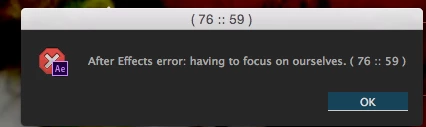
"After Effects error: having to focus on ourselves (76 :: 59 ). I can find nothing about it online or any relevant error codes.

Screenshot below
13 replies

alex_fantastic-agency
Participant
Feb 9, 2026 9:45 AM UTC

It is an Animation Composer issue, you may have an update to do on it or reinstall the plugin, i had the same :)

Translate
Demand Marketing
Known Participant
Jul 10, 2025 2:50 PM UTC

I have started receiving the life advice. Same wording. Same numbers. I have no idea of the reason. I have had it happen with completely different projects open! @tardigrade01  did you get any further with it? I'm not After Effects code savvy whatsoever. Cheers!

Translate
nishu_kush
Legend
Jul 10, 2025 6:50 PM UTC

Hi Demand Marketing,


Is there a specific action/command that triggers the issue? Are you using any third-party plug-in or script? Try removing them and see if that helps.

Let me know how it goes.


Thanks,
Nishu

Translate
Participant
Jul 15, 2025 12:33 PM UTC

Hello, I see you are an Adobe employee, and I am also experiencing this error. It recently appeared after updating the Animation Composer plugin to version 4, but I cannot say for sure that it is specifically responsible for this.

On both devices (PC, laptop), this error appeared very recently when I tried to edit text by double-clicking on it to select it. However, when I select the text again after this error, it disappears.

Unfortunately, this happens on all text layers in the project, making it impossible to quickly edit subtitles in After Effects.

Translate
Alexander Rott
Known Participant
Dec 4, 2024 10:36 PM UTC

I have recieved this error twice today. It seems to prompt when switching to a different program, then coming back, when having a text field selected. 

Running macOS Sequoia on an M3 Max. AE v24.6.3

Translate
Alexander Rott
Known Participant
Oct 28, 2025 2:48 PM UTC

I have been getting this error quite frequently again for a current project that I'm working on and able to finally reproduce it with ease. Apparently when you are changing a text field, then immediately click into another comp tab (without clicking to exit said text field), THEN click to edit some text in the new comp you clicked into, it immediately comes up with that error. That seems like a lot of steps to produce, but when you have a TON of different comps all with text that needs to be edited, having that error constantly come up is frustrating. I now have to remember to un-select the text i'm working on BEFORE I go to another comp. Using Ae 25.5.0 on the same M3 Max.

Translate
nishu_kush
Legend
Oct 29, 2025 4:32 PM UTC

I tried the steps on an M2 Max machine. I didn't see the error. Check if removing the plug-ins helps, as suggested by @knowledgeable_Haven3755 


Thanks,
Nishu

Translate
tardigrade01
Inspiring
Mar 8, 2016 10:03 PM UTC

it indeed seems to be tied to a custom filter I made in angular. I can't say why, but it could have to do with the fact that the filter is using the digest cycle continuously. Anyway, what an odd error; I thought it was sharing life advice.

Translate
stib
Inspiring
Mar 9, 2016 4:08 AM UTC

I've just though of a great new AE plugin: one that generates error messages that give you wise advice for living.

Translate
tardigrade01
Inspiring
Mar 9, 2016 8:04 PM UTC

Ha. Well, it has reared its ugly head again; I thought I had caused it by including some conditional matching loops in a custom angular filter, which could cause an infinite digest cycle, but even after changing the filter to a watch function and removing any loops, the "life advice" persists. Curiously, if I stringify a certain asset, the error goes away, and I can create new layers to my heart's content. The only other place I have seen any mention of this error is from a Creative Cow Post in 2011.

The mystery continues...

Translate