


fredbelchior
Participant
Mar 17, 2018 10:38 PM UTC
Question

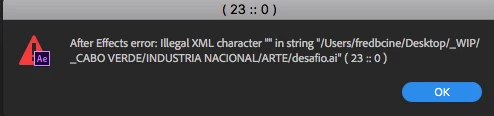
After Effects Error: Illegal XML character "”in string

Im having this problem when i import any image (png, ai, psd, anything). AE is interpreting the image as offline.

But when i close and open the after effects, the image is there.

Anyone having this same problem and found a solution?

thks !

After Effects Error: Illegal XML character "”in string....
    

12 replies

Participating Frequently
Jun 10, 2024 5:54 PM UTC

Hi. Does anyone have a solve for this? I am getting a similiar error. When I place the .mov into a different folder it will then add the file to after effects without colorbars (offline). Very frusterating.


After Effects 24.4.1

Mac OS 14.3 (23D56)

3.2 GHz 16-Core Intel Xeon W

AMD Radeon PRO W6800X 32 GB

192 GB 2933 MHz DDR4


Any help would be great. Thanks!

Translate
Participant
Jan 23, 2025 7:59 PM UTC

I was having the same problem and I exported the problem file and stripped all the color profile data from it and was able to import the file without issues.

Translate
Cybersoft Creative
Participant
Jul 21, 2021 3:35 AM UTC

Just keep hitting return, eventually the error disappears

Translate
Participant
Mar 17, 2022 1:28 PM UTC

This worked for me. By far the quickest solution. I hit "enter" 5 times and it disappeared and my changes immediately propagated.

Translate
Participant
Jun 1, 2018 1:03 AM UTC

I'm having this exact same problem. Can't import anything into AE, and receive the same 23:0 message display.

Did you find a solution?

Translate
Participant
Jun 1, 2018 1:55 AM UTC

Turns out the error only occurred when trying to import files that existed in the same folder as the project.

Seem to have found a fix though.

Simply renamed the folder the project (and the files) lived in to something else.

I don't know what caused AE to hate that particular folder and it's name.

There was nothing unusual about the characters in it's name. Was working perfectly for weeks until the error suddenly began appearing.

Translate
Participant
Apr 29, 2021 10:16 PM UTC

Thanks, this worked for me. Just had to create a new folder, cut everthing out of the old one, put it in the new one and everything worked again... totally random error

Translate
Mylenium
Legend
Mar 18, 2018 8:30 AM UTC

Start by not storing your stuff on your desktop. Typical Mac nonsense.

Mylenium

Translate
fredbelchior
Participant
Mar 18, 2018 6:24 PM UTC

thanks for the tip, but didnt work =/

Translate
Kevin J. Monahan Jr.
Legend
Mar 27, 2018 1:24 AM UTC

Still struggling with this, fredbelchior? Let us know so we can assist.

Thanks,
Kevin

Translate
Kevin Monahan - Sr. Community and Engagement Strategist – Adobe Pro Video and Audio