
mariuszw1912
Participant
October 30, 2017
Answered

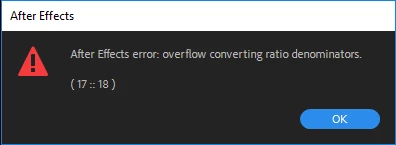
After Effects error: overflow converting ration denominators (17::18)

  • October 30, 2017
  • 3 replies
  • 2347 views

Windows 10 Pro Version 1703 OS Build 15063.674

AMD Ryzen 7 1700X

16.0GB Ram

Adobe After Effects CC Version 15.0.0 (build 180)

Adobe Premiere Pro CC Version 12.0.0 (build 224)

Creative Cloud Version 4.3.0.256

Working with a new install of OS and newly installed version of Adobe CC.

1.  Import MP4 video file into Premier.  I make my cuts.  No special effects of any sorts are added to the footage.  Only cut.  I have also attempted with the unedited footage.

2.  Select my clip in the timeline that I would like to use Dynamic Link on. Right click on it and go to "Replace with After Effects Composition"

3.  After Effects opens.  I have also tried with After Effects already open.

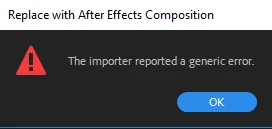
4.  Recieve the following errors.

1st one is from AE
This one shows up in Premier
*  I have attempted to match the frame rate as shown in other forums with no resolve/

*  I am able to import video straight into After Effects and work on it with no issue but not able to use Dynamic Link within Premier to work with After Effects.

Any help would be great. If I am missing something please let me know to get you more details.

Thank you

This topic has been closed for replies.
Correct answer Kevin J. Monahan Jr.

MariuszW,

Variable frame rates are not supported. That could be at the heart of the situation. Let us know if constant frame rate footage solves your issue.

Thanks,
Kevin

3 replies

mariuszw1912
Participant
November 1, 2017

I have tried the following workaround.  Use media encoder to encode the footage to 60fps.  I am then allowed to import the footage into Adobe premiere and use dynamic link.

Isn't Adobe premiere supposed to work with all video formats?  Still looking to get Dynamic Link working.

Any suggestions would be appreciated.

Thank you 

Kevin J. Monahan Jr.
Community Manager
Kevin J. Monahan Jr.Community ManagerCorrect answer
Community Manager
November 2, 2017

MariuszW,

Variable frame rates are not supported. That could be at the heart of the situation. Let us know if constant frame rate footage solves your issue.

Thanks,
Kevin

Kevin Monahan - Sr. Community and Engagement Strategist – Adobe Pro Video and Audio
mariuszw1912
Participant
November 2, 2017

Thank you for the reply.

Variable frame rate is the issue here for sure.

Thank you for your help that answers my question.

mariuszw1912
Participant
October 31, 2017

Thanks for your reply. 

I have attempted the following.  The raw mp4 footage has the following settings. 

When the dynamic link is used and the footage is imported through AE I navigate to Comp settings and have changed the frame rate to match the footage above.  I have also attempted to change the footage to 60fps there is no change and I'm still not able to see the video.

Is there a way to change the settings of the sequence in Premier? 

I was only able to see the settings below.

Thank you for your help.

dj.summitt
Inspiring
October 30, 2017

When you matched the frame rate did you interpret to a whole number?