
Participant
October 8, 2022
Question

After Effects error: preferences file " Adobe After Effects 22.5 Prefs.txt"

  • October 8, 2022
  • 2 replies
  • 5359 views

Hallo, Wie geht's?
can anybody help me out with the error I'm going through right now?

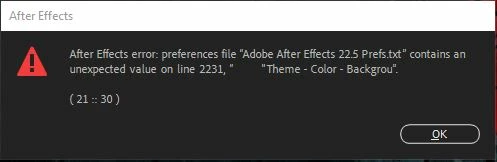
After Effects error: preferences file " Adobe After Effects 22.5 Prefs.txt" contains an unexpected value on line 2231, "          "Theme - Color - Backgrou".


( 21 :: 30 )


I've attached the screenshot of the same error message written up here,


2 replies

Kyle Hamrick
Community Expert
Community Expert
October 8, 2022

To restore the default preference settings, press and hold the following keys while the application is starting.

  • Ctrl+Alt+Shift (Windows)
  • Command+Option+Shift (Mac OS)

You'll see a pop-up that asks you to confirm if you want to delete your preferences. Choose "ok."


Let us know if this doesn't fix your issue!

Participant
May 25, 2025

Sorry. After I oressed Ctrl+Alt+Shift (my system - Windows)- nothing happened

Kyle Hamrick
Community Expert
Community Expert
May 25, 2025

Double-click the program icon, then immediately hold the three keys until you see a pop-up with startup options.

Mylenium
Legend
October 8, 2022

Delete the preferences file in your user folder so it gets re-created with factory defaults.


Mylenium

Participant
October 12, 2022

Ok, Thank you!