
Participant
June 15, 2020
Question

After Effects footage is glitching when previewed and exported.

  • June 15, 2020
  • 4 replies
  • 648 views

Hi there, 

I'm having a glitch issue in the After Effects program and I can't seem to get rid of it. 
Project Info

  • After Effects CC 2020
  • Composition Preset: HDTV 1080 29.97, 1920x1080
  • The footage that is glitching is a MacBook screen recording .mov file. 

The original screen recording file doesn't have a glitch but when imported into After Effects the glitch appears in the project window preview as well in the rendered export. See image below.
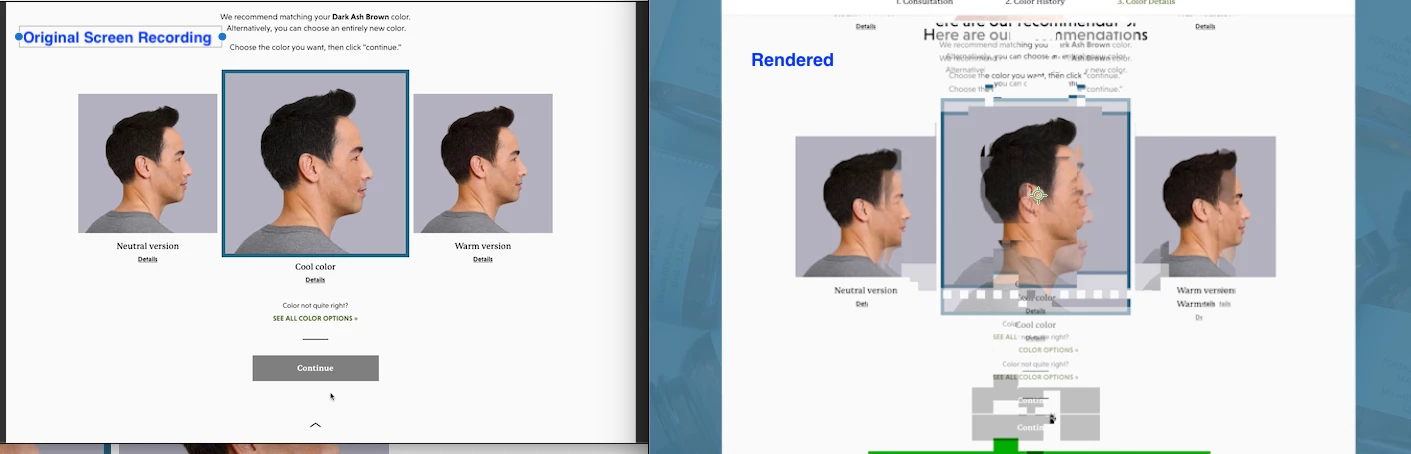


Is there a fix for this?


Thanks!

This topic has been closed for replies.

4 replies

Community Expert
December 31, 2021

In the After Effects project, right click the screen recording .mov file and choose Reveal in Finder.


In the Finder, right-click the screen recording .mov file and choose Encode Selected Video Files.


When the Encode Media dialog box appears, set the Setting pop-up menu to Apple ProRes and then click Continue.


When the transcode to ProRes is complete, return to the After Effects project, right-click the screen recording .mov file and choose Replace Footage > File.  In the Replace Footage  dialog box, choose the transcoded ProRes .mov file.


Render the Comp again.


The ProRes file size will be much larger than the original screen recording file size; however, that's because it's good for use as source footage.  If you need to free up drive space, watch the ProRes file from start to finish to verify that it transcoded well and then delete the original screen recording.

Bravo After
Participant
December 30, 2021

No need to download anything, at least not in my case wich was pretty much the same was happening to you.
If you have a glitchy video from a screen recording on mac, you can go to https://onlinevideoconverter.com/
and upload your file there, then download as mp4. 

nishu_kush
Community Manager
Community Manager
June 17, 2020

Hi khalilahc80650445,


Thanks for reaching out.

I agree with what Mylenium said. You can use Handbrake to transcode the footage.

Let us know how it goes.


Thanks,

Nishu

Mylenium
Legend
June 16, 2020

You may need to conform/ convert the footage in another tool. Screen recordings can have all sorts of weird stuff liek variable framerates or uneven MPEG streams, none of which AE deals well with. Other than that of course check your hardware acceleration settings in AE.


Mylenium