


Participant
October 1, 2026
Question

After Effects Fresh Install crashes on launch (Windows 10)

  • October 1, 2026
  • 6 replies
  • 37 views

After Effects 25.5 Crashes on launch. Splash screen launches but just a mere seconds after a crash window pops up. Splash screen never gets past “Initializing MediaCore”
Crash Window always displays a different code or error. Latest one was this one. 
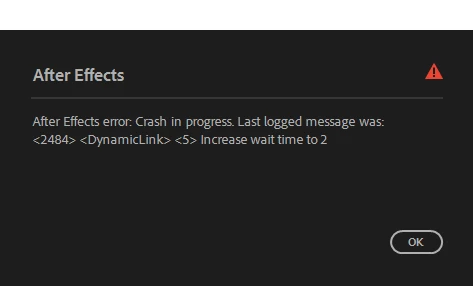
This is a fresh install of After Effects. No third party plug ins or preferences.I have the same problem with Illustrator. 
I already tried:

  • Uninstall AE and Creative Cloud and do a fresh install (deleting all related adobe files from C:/)
  • Using Adobe Cleaner Tool
  • Using Adobe CC diagnostics tool (for some reason it only wants to diagnose troubles with premiere pro, which is not installed)
  • Install another version
  • Graphic Drivers are up to date
  • Reinstalled Graphic drivers
  • Windows is up to date (WIN 10)
  • Restarted my PC several times
  • Run as administrator 
  • Installing Older Builds

My PC specs are

Windows 10 build 19045

Nvidia GTX 1660 OC

RAM 32GB

AMD Ryzen 5 3600 (no integrated graphics so disabling GPU is not an option) 

I would appreciate any help you can give me. This is driving me nuts and making my work harder. 


6 replies

Nishu Kushwaha
Community Manager
Community Manager
October 2, 2026

Hi, since AE is crashing specifically at "Initializing MediaCore", it's worth testing if there are any files from the plug-ins.

Try this:

1. Quit all Adobe apps.

2. Navigate to: C:\Program Files\Adobe\Common\Plug-ins\7.0\MediaCore

3. Move everything inside that folder (except dummy.txt) to a temporary folder on your Desktop — all files and folders.

4. Launch AE.

With no plug-ins available to load, AE should get past the MediaCore initialization.

Let us know how it goes.


Thanks,
Nishu

Participant
October 2, 2026

Dummy.txt is the only file inside that folder. Tried Launching. Crash Still happens. 


Nishu Kushwaha
Community Manager
Community Manager
October 5, 2026

Thanks for getting back. Can you try launching After Effects by double-clicking a project file (.aep) instead of opening it from its icon?

If that doesn't help, please share the crash log. Since AE crashes before you can enable logging normally, you can force a log by pre-creating the log file:

1. In File Explorer, navigate to: C:\Users\[your Windows username]\AppData\Roaming\Adobe\After Effects\25.5\logs

(If the "logs" folder doesn't exist, create it.)

2. Create a new empty text file in that folder and name it exactly: After Effects Log.txt

3. Launch After Effects and make it crash.

4. Open the "After Effects Log.txt" file you created — AE should have written to it during the startup attempt. Attach the file here or paste its contents.

Looking forward to your response.


Thanks,
Nishu

ToolfarmJP
Community Expert
Community Expert
October 2, 2026

Can you run After Effects by safe mode?

Participant
October 2, 2026

No. The crash screen will appear before I finish clicking the “start on safemode” option