
Known Participant
April 17, 2024
Question

After Effects gets stuck at the end of render

  • April 17, 2024
  • 5 replies
  • 1707 views

I've been having this problem lately where After Effects gets stuck at the end of a render, without ever finishing it; but at the same time, when I check the render folder, it has finished the render.


I always work in image sequences, so when some render breaks it's not usually a problem, but this has happened multiple times now and with some semi-simple renders, so it's strange.


Here's a screenshot of the render queue I left last night:
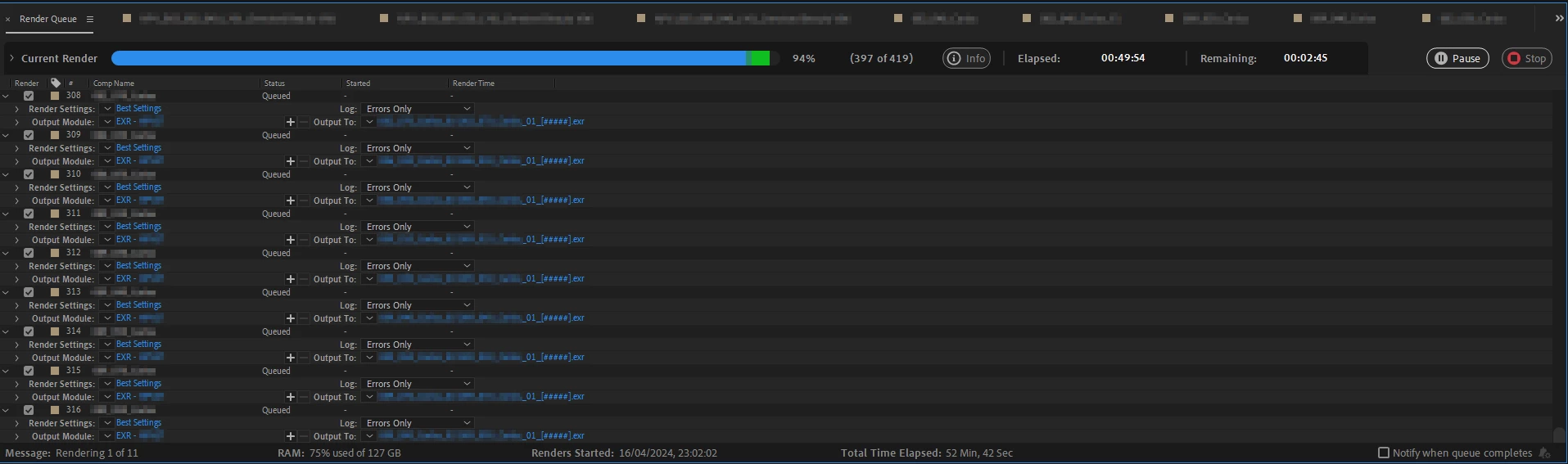
As you can see, the render queue got stuck at the end of the very first render. However, when I went to check the render folder, my surprise is that it seemed done: all the frames were there, with their corresponding information, the sizes were correct and they looked fine. So that's the most strange part. Even though After Effects said only 397 frames were processed, I found the whole 419 of them.


And again, this has happened multiple times in the past few days. Any ideas why? Anyone experienced something similar in the past? How did you fix it?


I'm using After Effects 24.3.0 on Windows 10, NVIDIA GeForce RTX 3090 with latest drivers.

5 replies

Participant
July 15, 2025

i also same as you, i stuck at ending 96% like forever

Participant
January 16, 2025

I'm having the same issue. Writing to local dropbox location synced to my SSD

collen
Known Participant
December 5, 2024

I have the exact same problem.  Renders stalling indefinitely on the last few frames.  Very simple comps, exporting to ProRes 422.  I have a bunch of comps that are 250 frames long, the render will speed thru until about frame 245 then take anywhere from 5mins to an hour to progress to the next frame.  Weirdly, doing other things on the computer seems to help move it forwards one frame, like for example launching chrome, or minimising and then fullscreening AE again, but this could just be a confirmation bias.  I had to leave renders running overnight and wasn't confident they would actually have completed, but they did.  


Attached is the render queue.  These five comps are identical apart from one line of text is changed in each, and export times range from 24 seconds to 2hr 1min.


I've had this issue for some time now.  It seems to occur more frequently as the AE project gets larger, I never have it with the first export out of a new project.

When the exports freeze, it does seem that all frames have actually been exported correctly. I just verified this in a test render - a 250 frame comp with a text layer, with a source text expression of timeToFrames().  Rendered and the render froze at frame 239.  I immedietaly force quit AE, then opened the ProRes file, and all frames had been exported correctly.  Last frame attached 


Very often I can force quit, reload AE and re-export and the renders then complete first time.  But this is an unecessary time sink for my workflow.  If I instead choose to wait for the renders to complete, then it seems that once this error starts occuring, it will keep occuring until AE is force quit and restarted.  Then its just a matter of time until it starts occuring again.


I am on v25.0.1, but there are reports on reddit of this issue going back three years. 

Windows 11, RTX 4080 Super, i9-14900K, 128gb RAM.

collen
Known Participant
February 15, 2025

I still have this issue.

nishu_kush
Legend
April 24, 2024

I'll move your post to the Discussions board while we await your information.


Thanks,

Nishu

April 18, 2024

Are you sure every frame had been written out and a frame earlier in the sequence wasn't missing? 

J5DDEAuthor
Known Participant
April 24, 2024

Yes, I even delivered those as the final renders. They were all correct.

In these past few days, the problem has been happening again from time to time. It has also happened with some H264 mp4 render. Same thing: left it during the night and found in the morning that the render queue was stuck, but the file was finished (while rendering H264 there's usually some temp file in the render folder, but this was not a temp file). 

April 24, 2024

Are you writing to a network drive or a local drive? If local, is it an external SSD? I'm not sure why AE would be failing to see frames that are written to disk, we don't have other reports of it that I know of, so just trying to think about external factors.