
Participant
January 14, 2020
Question

After Effects has encountered a failure related to GPU-enabled effects on this frame

  • January 14, 2020
  • 1 reply
  • 3984 views

Hi, I'm currently doing the After Effects Beginning tutorials and whenever I try to play videos on the timeline, it tells me "After Effects has encountered a failure related to GPU-enabled effects on this frame." 


I am on Windows 10 and I'm using a GTX 1080. I have 32 GB of RAM. This is 17.0.1 ver. It says that it's most likely because it's using too much memory, but when I look at CAM, it says that it's always at a very low % of usage. 
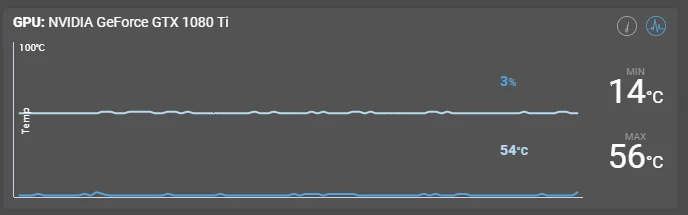
 

Thank you!

 
This topic has been closed for replies.

1 reply

Roland Kahlenberg
Legend
January 14, 2020

Which effects have you applied to the layers in the Timeline?


Which version of AE are you using?


Have you updated your GPU Drivers to the latest version?


Try disabling GPU acceleration in the Project Settings Panel and let us know if this solves your problem. Regardless of the result, ensure GPU drivers are updated.

Very Advanced After Effects Training | Adaptive & Responsive Toolkits | Intelligent Design Assets (IDAs) | MoGraph Design System DEV
a rockAuthor
Participant
January 14, 2020
I am using 17.0.1 of After Effects, and GPU is completely updated. No
effects have been applied, I've just dragged the AI file and mp4 file Adobe
has provided for the tutorial into the timeline. IT works if CUDA is
turned off, but my GPU definitely should be able to be utilized here.

Thank you!
Roland Kahlenberg
Legend
January 14, 2020

CUDA is a very specific aspect of hardware acceleration dealing with AE's ray-tracing engine. AE's ray-tracing engine was removed in AE V19 (CC16). The more generic flavor of AE's hardware acceleration is defined as the Mercury Engine and this is the same engine that drives PPro's hardware acceleration.


Take a look here, at Szalam's post on how to enable hardware acceleration for untested GPUs - https://community.adobe.com/t5/after-effects/how-to-enable-cuda-feature-on-ae-cc2017-with-nvidia-m5000m-gpu/td-p/8699860


And this is the official write up on AE's hardware/GPU acceleration -

https://helpx.adobe.com/after-effects/using/basics-gpu-after-effects.html


Very Advanced After Effects Training | Adaptive & Responsive Toolkits | Intelligent Design Assets (IDAs) | MoGraph Design System DEV