Participant
September 23, 2021
Answered

After Effects keep crashing on render
  • September 23, 2021
  • 1 reply
  • 1330 views


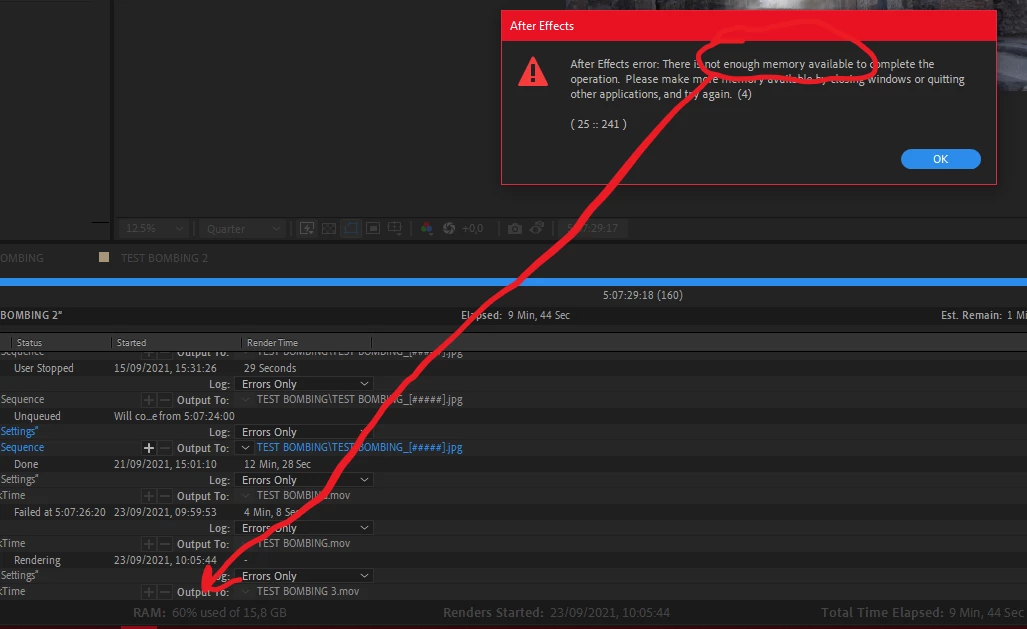
I keep getting this message of not enough memory available. I have plenty of Gb on the HDD and as you can see I'm using very few memory. Any ideas? Thanks

This topic has been closed for replies.
Correct answer Rick Gerard

You should not go into preferences and just allocate all available ram to Adobe. Adobe likes even numbers of GB and so do the other apps. Pick 2 or 4 GB for other apps first and see if that solves the problem. It is completely possible to run out of system resources when rendering, especially if you have motion blur/ lights and shadows, or any kind of time-bending. The reported ram usage is just an average estimate. Come upon a frame that requires more ram than is available and AE will hand up and report the problem before the calculations of ram usage are displayed. 

1 reply

Community Expert
September 23, 2021

You are running out of RAM, not drive space. You have either created a comp that is too large or you are using a memory-intensive effect like a particle system or echo, or time displacement in your project. Without workflow details and screenshots of your comp showing the modified properties of the layers, we have no idea where the problem lies. 


The way for you to troubleshoot the problem is to select all layers, press the U key twice, look for effects that might be using a lot of memory and start turning them off of changing the settings one at a time until the problem is resolved. The way to get some help is to show us or tell us exactly what is going on in the comp.

TerritorAuthor
Participant
September 23, 2021

Hi Rick,

thanks a lot for the quick response. Indeed I have some Luma Key filters, Hue&Sat filters, Curves and blending modes in a 3d comp with camera tracking. What I don't undertand is that in my preference I allocated most of the RAM for AE and I have no other program running at the same time. If AE is telling me that it's using max 60% of the RAM (see pic), how I can still run out of RAM?

Rick GerardCommunity ExpertCorrect answer
Community Expert
September 23, 2021

You should not go into preferences and just allocate all available ram to Adobe. Adobe likes even numbers of GB and so do the other apps. Pick 2 or 4 GB for other apps first and see if that solves the problem. It is completely possible to run out of system resources when rendering, especially if you have motion blur/ lights and shadows, or any kind of time-bending. The reported ram usage is just an average estimate. Come upon a frame that requires more ram than is available and AE will hand up and report the problem before the calculations of ram usage are displayed.