

After Effects Mac Issues
Hello everyone,
I have been asked to create a well documented thread regarding several issues that "I feel" seem to be related in regards to After Effects and memory. It seems a large amount of Mac users have posted that they have been experiencing troubles with rendering, whether this is a RAM preview or a full render from the render queue. I am not alone in my complaint nor in my request for a full fix; there are many related posts.
I have two identical mac pros to test/render with; one system is on Mavericks and one system is on Yosemite. This is to prove without a doubt that is has NOTHING to do with the OS.
Mac Pro (Late 2013)
OSX Yosemite 10.10.1 OR Mavericks 10.9.5
3.5 GHz 6-Core Intel Xeon E5
16 GB 1866 MHz DDR3 ECC
Macintosh HD
AMD FirePro D500 3072 MB
The After Effects version is the latest (today I updated): 13.2.0.49
When I attempt to render out a sequence that is short with little effects, it will render out. Anything that is a bit more complicated, I am getting some serious memory crashes. It is as if the RAM is not clearing old RAM in the cache.
Step 1
I am rendering out a CG scene for an upcoming short film. It is taking 4 hours to render out 20 seconds (which again may be related to Adobe not playing nice with RAM and OS X). About 1.5 hours in it was using 32% of the available system ram. At 2.5 hours in (as seen below in the screenshot) it is now using 75% of 16 GB.
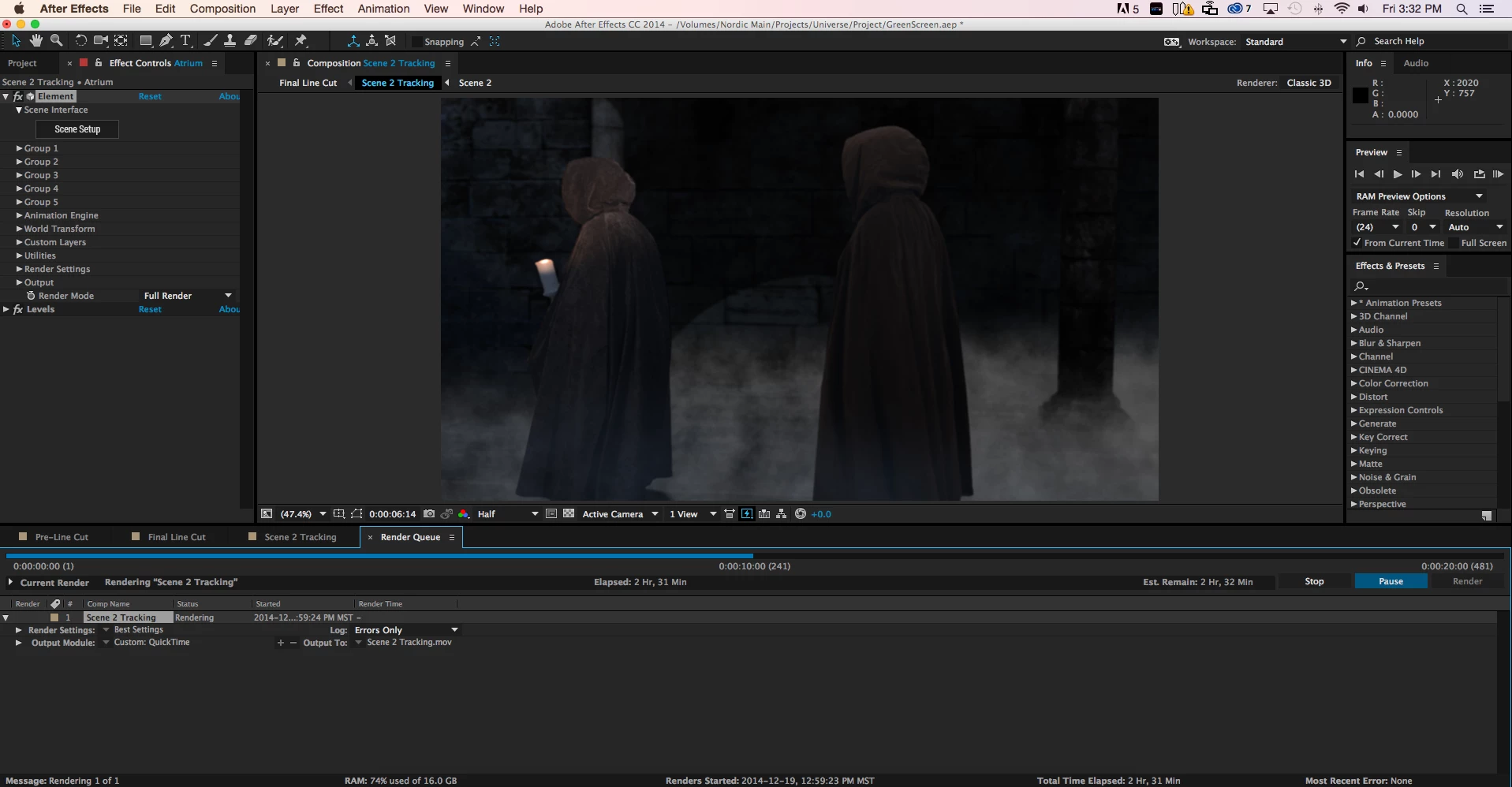
Step 2
As I am writing this I am simply waiting until the application will eventually crash and it will give me the famous:
"Unable to allocate 0.000 MB of memory, Either decrease the memory requirements for rendering of this frame, or install more RAM...."
Points of Note
- This RAM error will occur on several difference sequences of the project above; it also occurs on a separate unrelated project that I am trying to render that I created 2 years ago. This proves that it is not related to a specific project, sequence, or individual effect settings.
- I have attempted rendering these sequences on both the Mac Pro with Yosemite and the Mac Pro with Mavericks. The same thing occurs.
- I have also tried rendering out these sequences with multi frame processing ON and OFF and using research from other posts to try and tweak the RAM per CPU to allow the project to render
Solution
I have been unable at this point to find a satisfactory solution.
Related Posts
One Adobe forum employee, who will remain nameless, has criticzed me for saying that the RAM issues that have gone unresolved for more than a period of one year are related. Sorry, the issues are RELATED. These issues seem to be related only to MAC users regardless of their hardware.
Post #1: "Unable to allocate 0.000 MB of memory, Either decrease the memory requirements for rendering of thi
- In this post a user from over a year ago posts initial reports regarding AE CC crashing due to memory requirements while rendering. This post is related.
- The "correct answer" is not correct as users have stated that the update suggested did not fix the problem
- The problem in this post is 100% mac users reporting
Post #2: "Unable to allocate memory" popup on Quit
- In this post the user reports that he is also having the "unable to allocated" ram message, but when he quits
- This post is over 1 year old
- a MAC user
- Several other posters recently have reported that they are getting a similar memory error
- This post is related because although he is getting a memory error when quitting and NOT when rendering, it is a similar error message on a MAC system and may help Adobe to find the solution
Post #3: unable to allocate enough memory to render current frameunable to allocate enough memory to render current frame
- This post is over 6 months old and also unresolved by Team Adobe
- The user also tried many of the tricks I did to try and render
- This post is intimately related, although he is getting the memory error during ram preview and not when doing a final render the RAM usage by After Effects would likely be very similar; if an Adobe engineer tells me they are not, I will then mark this post as un-related
- the SUGGESTED ANSWER of audio scrubbing UPDATE has NOTHING to do with the original poster's statement; just wanted to point that out
I've seen probably 2-3 dozen related posts regarding RAM issues like mine at the posts above. Most of the "suggested answers" in these posts suggest the original poster to update their After Effects to a latest version. In the majority of these cases the original poster replies that the update did not solve their issue.
Sincerely,
Matthew
 AdChoices