
Participant
November 2, 2021
Answered

After effects menu bar and mouse right click not working [macOS Monterey]

  • November 2, 2021
  • 13 replies
  • 16135 views

Hello everyone!
After i upadeted my macbook pro m1 to macos Monterrey my after affects stop working good.

This menu bar not working correctly when i try click on file, edit, compisition etc. I have to pess and hold the left mouse click to open the menu but it still not work correct.

Beside it, when i do right mouse click on for example composition menu - it doesnt work. Nothing happens when i do right clock. Its not open. 

please,help me.

p.s. i have macos monterrey 12.0.1
and all i said about doesnt working on AE 22 and old versrions too.
Correct answer Rameez_Khan

Hi all,


My apologies that you're experiencing this bug. Thank you for reporting this and sharing workarounds.

The After Effects team is working on this. I'll share an update as soon as the bug is fixed.


Meanwhile, I'm posting all the workarounds in this post so that it's easier for the community to follow them without having to go through all the comments.

Workaround 1: Open the project file in Finder (not from After Effects)

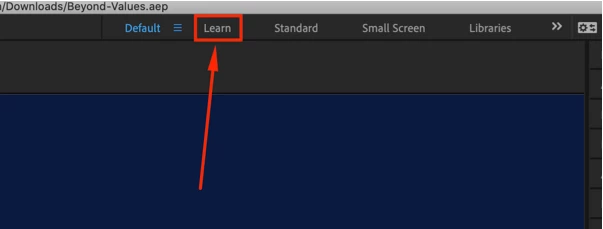
Workaround 2: Click the “Learn" workspace preset

Workaround 3: Unplug the secondary monitor (if you have dual monitors)

Workaround 4: Close the “True Layer Duplicator” plugin window (if you're using that)


NOTE: I'm tagging this as a Correct Answer for now. When the bug-fix is available, I'll unmark this as the Correct Answer.


Thanks,

Rameez

13 replies

Inspiring
December 8, 2021

Same issue, see my video here. AE 2022 cannot be used at all. I have to use 18.4.1.

Participating Frequently
January 7, 2022

I have this exact same issue with AE2022 and AE2021. I cannot do the work I'm being paid to do. 
@nishu_kush 

Shivangi_Gupta
Community Manager
Community Manager
January 7, 2022

Hi there,

We appreciate you mentioning it here. Are you also using macOS 12.0.1?

Did you try resetting the preferences as suggested by my colleague?


Let us know.


Regards,

Shivangi

nishu_kush
Community Manager
Community Manager
November 2, 2021

Hi Andrey,


Sorry for your issue.

If it doesn't help, I'd suggest testing with a different mouse.
Let us know how it goes.
 
Thanks,
Nishu
Inspiring
December 8, 2021

Neither has any effect on the issue.


Sheaney
Participant
January 5, 2022

Found this on a different thread. It works, but still not ideal, as you can't just open AE and get the menu working.


"Adobe support suggested I open a different project from the finder. In the new project, menu behaviour was normal. Next, start a new project and import the problem project into it. No explanation other than it is a "project-specific error."

Participant
November 2, 2021

UPD:

When i finished my post about AE troubles i opened the AE and it start working correct again. Its good news but the troubles i told about will come again and again when i restart my Mac. It fixed itself. But i want to figure out what is the problem. I cant wait every time when it will be fix itself. Please, explain me the problem and its solution maube.