Participant
April 12, 2013
Answered

After Effects not letting me merge shape layers?

  • April 12, 2013
  • 1 reply
  • 30724 views

I got after effects cs6. I'm working on building a somewhat complex shape made of 5 shapes using the pen tool and I wanted to merge them together. but it's not letting me. I've looked at the documentation and it says all you need to do is select the shapes you want to merge and Ctrl+G or Layer > Group Shapes. Neither works for me, though. Group Shapes is grayed out on the menu.

It's pretty frustrating to me cause I spent a bit of time making this shape. I hope I'm just missing something simple... if i'd of known it was going to be this annoying I would of just made the shape in illustrator.

Thanks for the help
This topic has been closed for replies.
Correct answer Rick Gerard

You have all of your shapes in a separate shape layer.

Copy and paste all of the shape paths to a single shape layers.

Then in a single shape layer select all of the paths and perform your group.

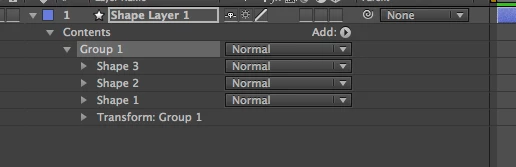
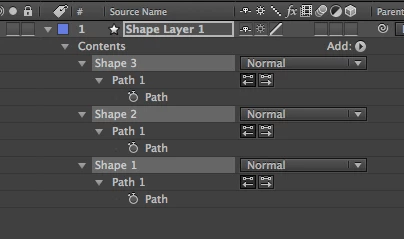
This:

becomes this:

1 reply

Mylenium
Legend
April 12, 2013

Provide a screenshot with the shape items selected and the shape hierarchy in the timeline also visible...

Mylenium

Participant
April 12, 2013

Ah, right, sorry. I should of provided one to begin with.

Here is a screen:

http://i.imgur.com/l6dmjYV.jpg

Rick GerardCommunity ExpertCorrect answer
Community Expert
April 12, 2013

You have all of your shapes in a separate shape layer.

Copy and paste all of the shape paths to a single shape layers.

Then in a single shape layer select all of the paths and perform your group.

This:

becomes this: