
HangYangYuri
Participating Frequently
April 10, 2018
Question

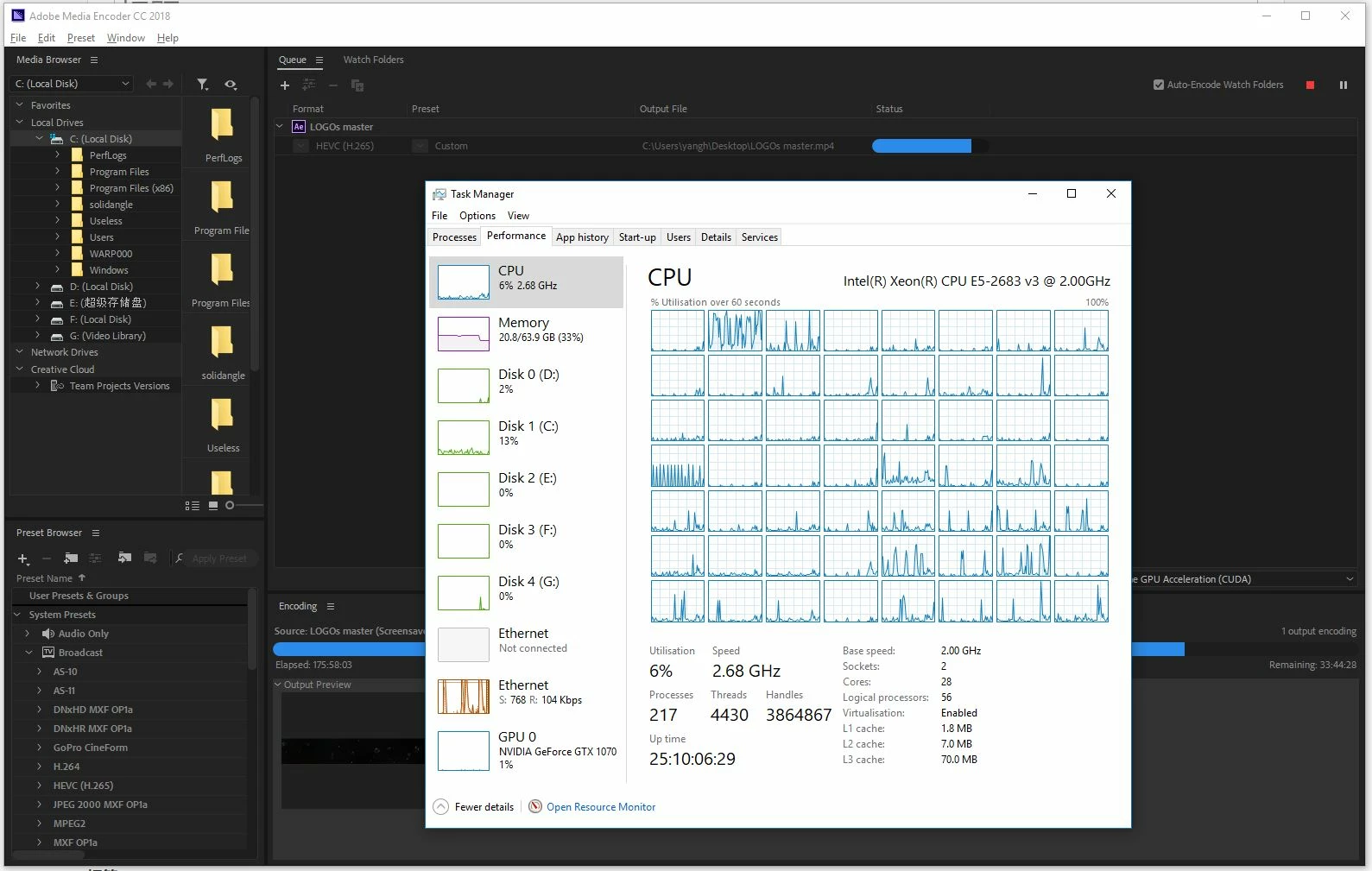
After Effects only uses one core for rendering! Can anyone solve this.

  • April 10, 2018
  • 9 replies
  • 29184 views

I do NOT need any information about the new features.

I just wanna know why the bloody hell AE only uses one single core of my computer?

It has continuously rendering for over 170 hours.. always ONE CORE.

Any idea? Can anyone help me? The project is overdue already but I have to watch this nonsense.

This is so frustrating.

This is the latest version.
9 replies

kyrong10629813
Participant
November 18, 2024

6 years later and not a single thing has changed. I'm sitting here waiting for a 15 second 4k comp to render to prores and its taking 55mins, STILL using only one core and only about 35% of that core. I'm so done with Adobe.

Dowding
Known Participant
October 30, 2025

7 YEARS later, running the latest and greatest CPU from AMD that's been tweaked to an inch for After Effects and it still looks terrible. Perhaps a complete re-write of AE is due and released as a new sister product before Cavalry takes over!

jefubbudu
Inspiring
November 8, 2025

I wrote an opinion piece on this back in 2018. 

Basically no it's not happening. You'll use AI and you'll like it because it means adobe doesn't need to invest in software development, just acquiring more third party tools and slapping them on a 1993 software like always.


If you need speed or efficiency, adobe isn't for you. 

...i miss when there were plugins for everything. Trapcode, red giant, twixtor... fun times. Before adobe went full subscription.


Never go full subscription.

jereyd12312771
Participant
April 10, 2020

Ive had this same problem with AE for a few years there are some render paths with premier pro that do the same thing also.

Ive gone from a 16core 32 thread to 8core here is the trick that will make a massive difference.

Build the machine as if you were building a gamming machine. Whats important here is single core speed actualy BASE CLOCK SPEED!

Look at your core clock speed its 2.68GHz not being funny but thats is really poor for this task, you may have many threads but its of no use infact its a hinderence.

This is what you do.

Buy a i9-9900K or 9900KS with a liquid cooler and lock your core base clock speed (overclock) to 4.5-5GHz, you can buy bunddle sytems allready overclocked for you. AE requires fast RAM in this configuration you can buy RAM 4000MHz and above.

This will more than halve your render times playback will also be inproved. Ive built hi end machines for years. Its not always the more the better. In this case its the faster thr better especialy with linear work loads. just the way it is 🙂

Participating Frequently
April 10, 2020

Hi there


I have a feeling that using PC computers would be faster and more accurate for AE then Mac computers.

Personnally, I am Mac for 30 years.


I work with the heaviest files ever in my life, for this personnal project : 350 shots are all in Proress 4444 (all with alpha channel) in Full Res (but i compose in Quarter resolution).  So, each shot are between 750 Mo and 2 Go.


I just bought the new Mac Pro 2019 (the new tower) and I choose this set up (for AE primarely) :

-8 cores (not 12, not, 18, not 24, not 28) at 3,4 Ghz (4 Ghz in turbo boost, but I don't know yet when it snaps...)

-384 GB of RAM (and if I would have more $, I would full it with the double 768 GB)

-The video card is AMD Radeon Pro Vega 2 ,32 GB.

-1 GB SSD

-I already have a Pegasus 4 disks, in RAID 0, that multiply the speed by 4  (but is in Thunderbolt 2, not 3)


I observe the Activity Monitor for weeks to see when the memory is used and when the CPU works.  What I saw is that no matter how big are the media list in your project.  But it really matters how big are the compositions and the numbers of composition in the timeline. 


The memory allow to AE is 306 Gig (the max).  When I preview, it becomes full pretty fast. I saw that the memory doesn't empty when I close the comp.  


With more money, I would buy the Pegasus 8 drives, Raid 0, in Thunderbolt 3, and another 384 GB of RAM.


So, I decided to compose during the day and place all the large Render in Queue, and I just start the list of renders before supper time...


Cheers

Participating Frequently
April 10, 2020

Hi there again


I forgot to say that when the CPU renders, the Activity Monitor says that the CPU is use, by exemple, at 336%.

That says to me,  3 cores are used at 100% plus 36% of a fourth core... right?

Does anyone could confirmed that my conclusion is right?


Thanks


Martin_Ritter
Legend
December 3, 2018

In fact, AE uses all CPU cores and even GPU, but it highly depends on the project, fx, plugins and workflow.

When I see that you are rendering directly into H265 on the Xeon @2GHz I really wondering what you did expect to happen?

Does Xeon CPU support hardware accelerated H265 de- and encoding anyway? I thought that's a feature of latest i-series CPUs only.

Also, a 2GHz CPU for AE is completely the wrong piece of hardware. I recommend at least 4GHz, the higher the better. You'll find nice test on https://www.pugetsystems.com/recommended/Recommended-Systems-for-Adobe-After-Effects-CC-144/Hardware-Recommendations#CPU

Note that Xeon's are not even mentioned ...

Also, rendering into a video file is not very safe or smart. What when your computer crashes right now? What if you have to change a little asset which appears only for 10 frames at the end? You'll have to start all over... !

It's way better to render into PNGs image sequence. You can use scripts like BG Renderer or RenderGarden to utilize all of your RAM and CPU resources. (But in your case, you won't benefit much from all your cores - when only AE is running and 33% are already used, you can start 2 more renderer and that's it. Running out of RAM increases rendering times in large amounts.).

And you can easily react to changes and mistakes, without the need of rendering everything all over again.

@jebi80938952​

Multiprocess rendering will never come back to AE again. AFAIK it was buggy and dropped for that reason. Also - as you can see with the use of scripts like RG Renderer or RenderGarden - it eats you all your RAM very soon, limiting you in spawning more processes. Every process need its own memory address range and data. But if you have an asset in every part of your comp, this asset will be loaded multiple times into RAM to be available for all rendering processes. This is nonsense.

The future will be multi-threaded and Adobe is already working on it. But this is a slow process: Adobe needs to ensure to not break the software, while keeping it alive by adding features.

In the meantime, we are lucky and can use 3rd party software to fill the gap, thanks to a wide API. That's not common with major software and I'm missing it in most other programs I'm using.

*Martin

Participating Frequently
February 18, 2020

Hi guys

My point of view on this is that Adobe have a part (or a particular) customer market.  They sell the Adobe suite for a relative cheap price compared to a program like NUKE (used for movies) which is around 6000$ to buy.  I used Nuke for a month once in the passed and the program uses 95% of the CPU when rendering!  It really rocks.  So, my POV is that Adobe and The Foundry (Nuke) probably made a deal like : Don't sell your program in my garden and I won't go in yours!  That's why AE will never render faster.

Participant
December 3, 2018

I still remember when after efffects used to have a feature called "Render Multiple Frames Simultaneously". It used multiple cores to render different portions of the timeline and it made substantially faster to render previews and scrud through the timeline.

For whatever reason, Adobe removed this feature from AE in 2014 or 2015.

The priority for Adobe should be to bring back this feature. I mean it.

All of this just makes me wish there was some real competition for AE out there. Maybe Serif or Autodesk could seize the opportunity?

Serif already makes great alternatives to Photoshop and Illustrator and they don't force to get a montly subscription (i.e. extorsion).

Honestly, Adobe shouldn't be able to get away with this. In the past few years their updates have mainly consisted of publicity stunts with no real benefit for Pro users.

Snakedogman
Inspiring
April 13, 2018

The BG renderer Pro script will help you utilize all your cores when rendering. Rendergarden probably does a similar thing though I haven't used it.

With BG renderer Pro you can simply start up multiple rendering instances on the same system. You have to render to image sequences but for render-intensive projects it certainly works fine and I can use pretty much 100% of my dual Xeon CPU power.

Speed Up After Effects Rendering Tutorial - YouTube

the_dudes
Inspiring
April 13, 2018

Well, afaik BGRenderer hasn't been updated since 2011, plus it doesn't give granular controls over how many processes it'll start. Rendergarden does that. Which is can come handy to balance out export performance.

Snakedogman
Inspiring
April 26, 2018

Perhaps, but updated or not, it still works and it is significantly cheaper than Render Garden so I just wanted to have it out there as a working alternative.

HangYangYuri
Participating Frequently
April 12, 2018

Now, 243 hours has passed. Still 3 hours!

My next step is to gradually give up this piece of rubbish. Cheers! to all those developers!

Participating Frequently
April 13, 2018

Have you tried the BG renderer script? you can download a demo... It's one extra step (importing the Seq that was rendered and converting to .mov or .avi) but you can make use of all your cores!

Participating Frequently
April 10, 2018

Render to PNG files with skip existing (multimachine rendering) on and use this BG Renderer Pro - aescripts + aeplugins - aescripts.com

Saved me numerous times when dealing with heavy composites!

Community Expert
April 10, 2018

Buy this: RenderGarden | by Mekajiki

The best rendering option for AE. Easily up to a 50% decrease in render time and you can still keep working in AE while your comp is rendering.

HangYangYuri
Participating Frequently
April 10, 2018

So adobe will never make AE multiprocessing?

And we have to pay more money to make this software efficient?

Mylenium
Legend
April 10, 2018

Who said that AE won't use MP ever? It's perfectly possible that one day it will, but even then the usual limitations apply. A lot of video processing simply is linear and can only run on one thread. That's not even AE's fault, it's a simple computational math thing plus factors like CoDecs not being threaded, effects breaking GPU acceleration and so on. You simply have the wrong computer for AE and expect magic things. I've written about this stuff a ton of times on this forum, so do a search for more explanations.

Mylenium

Dave_LaRonde
Inspiring
April 10, 2018

This is something you should have known already: After Effects only uses one core.  This may be your first post so you didn't seek advice before you began.  Any advice we could give now requires that you stop the render to provide diagnostic information.

You, sir or madame, are STUCK at the moment. Big-time.

You can't stop the render for fear of missing the deadline by even more than you are already missing it.  Pray you haven't made a mistake.

The bright side:  you can do a post-mortem to help speed things along on future projects.

HangYangYuri
Participating Frequently
April 10, 2018

If AE can only use one core, so what is the point I seek advice before I began?

So let's say I haven't begun. What would you do to make the render faster?