maxg66472442
Participant
July 21, 2018
Answered

After effects playback lags and skips frames.

  • July 21, 2018
  • 1 reply
  • 5335 views

Alright so heres my issue.

Whenever I will playback a composition in after effects, it will skip/lag frames. This even happens at third and quarter and half quality. Im not sure what the issue is and im sure it just a simple setting. I have like 18 gbs ram and a 1.5 gb graphics card.

Thanks on advance!
    This topic has been closed for replies.
    Correct answer Kyle Hamrick

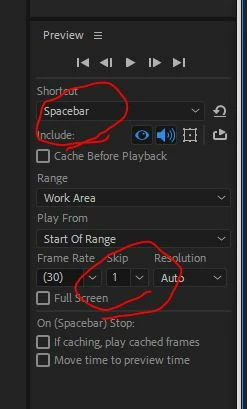
    Make sure your settings in the Preview panel are set correctly for the hotkey you're using to trigger your preview. You can create different settings (including skipping frames) for the various hotkeys.

    If that's not the issue - are you seeing this with everything, or only certain file types? Working off an external drive?

    1 reply

    Kyle Hamrick
    Community Expert
    Kyle HamrickCommunity ExpertCorrect answer
    Community Expert
    July 21, 2018

    Make sure your settings in the Preview panel are set correctly for the hotkey you're using to trigger your preview. You can create different settings (including skipping frames) for the various hotkeys.

    If that's not the issue - are you seeing this with everything, or only certain file types? Working off an external drive?

    maxg66472442
    Participant
    July 22, 2018

    Yep that was it. It was set to 5 frames.

    Thanks you.