Participant
October 15, 2025
Question

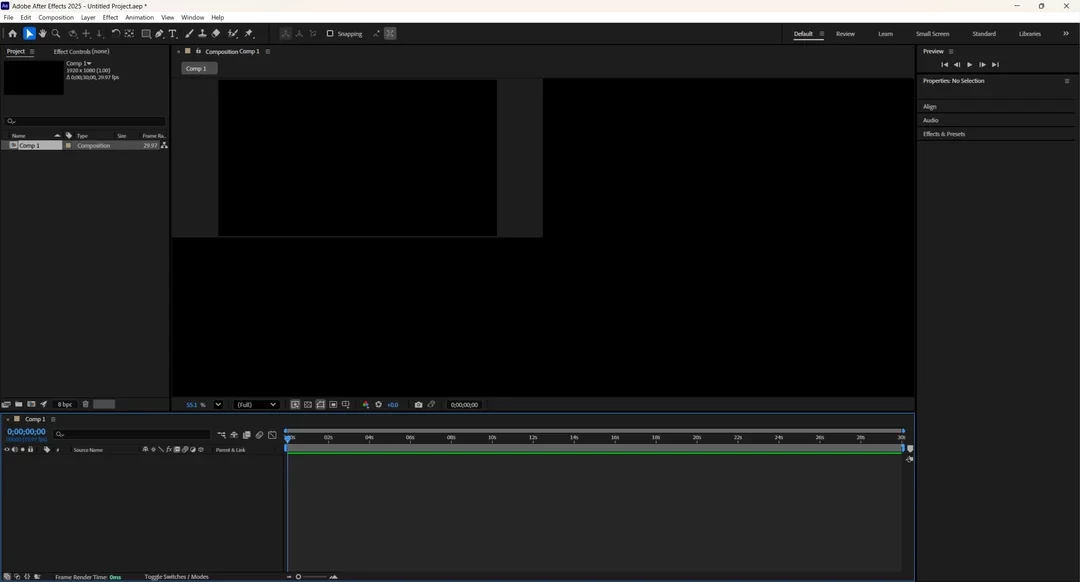
After Effects Preview Pane stuck small like this
  • October 15, 2025
  • 5 replies
  • 151 views
 

My Preview Pane is stuck like this. I have reinstalled AE, restarted my PC, looked through the Window Tab at the top, and the Preferences.

5 replies

Participant
October 18, 2025

Also, just to clarify, I have had it run perfectly fine before. I dont remember what exactly I did to make it this way, but the last thing I remember doing what messing around with a CC Particle World.

nishu_kush
Legend
October 24, 2025

That's not ideal.


Try updating your GPU driver to the latest Studio driver from the Nvidia website. If that doesn't help, try clearing the cache (Edit > Purge > All Memory & Disk Cache) and running After Effects in Safe Mode.

Let us know how it goes. Moving this thread from Bugs to Discussions for troubleshooting.


Thanks,
Nishu

Participant
October 18, 2025

OS: Windows 11

CPU: AMD 9950X3D

GPU: NVIDIA GeForce RTX 4070 SUPER

RAM: 64 GB


Kyle Hamrick
Community Expert
Community Expert
October 17, 2025

I haven't seen this before, but I'm inclined to think it might be related to your GPU. 

I'd probably just recommend getting directly in touch with Adobe support, but posting your full system specs here would give us more to work with in the meantime. 

Participant
October 17, 2025

This is in Safe Mode, problem still persists.

Kyle Hamrick
Community Expert
Community Expert
October 16, 2025

...Odd. 


I wouldn't think this setting would persist, but worth checking ... try setting a layer to 3D, so you can see the 3D options at the bottom-right corner of the viewer panel. Confirm that the right-most dropdown menu is set to "1 View." 


I only mention it because this looks similar to the 4 Views setting (though it's missing a few UI elements). 


Do you have other third-party tools installed? Have you tried starting AE in Safe Mode?