
Participant
February 28, 2021
Answered

After Effects Preview Skip Frame Not Working

  • February 28, 2021
  • 3 replies
  • 611 views

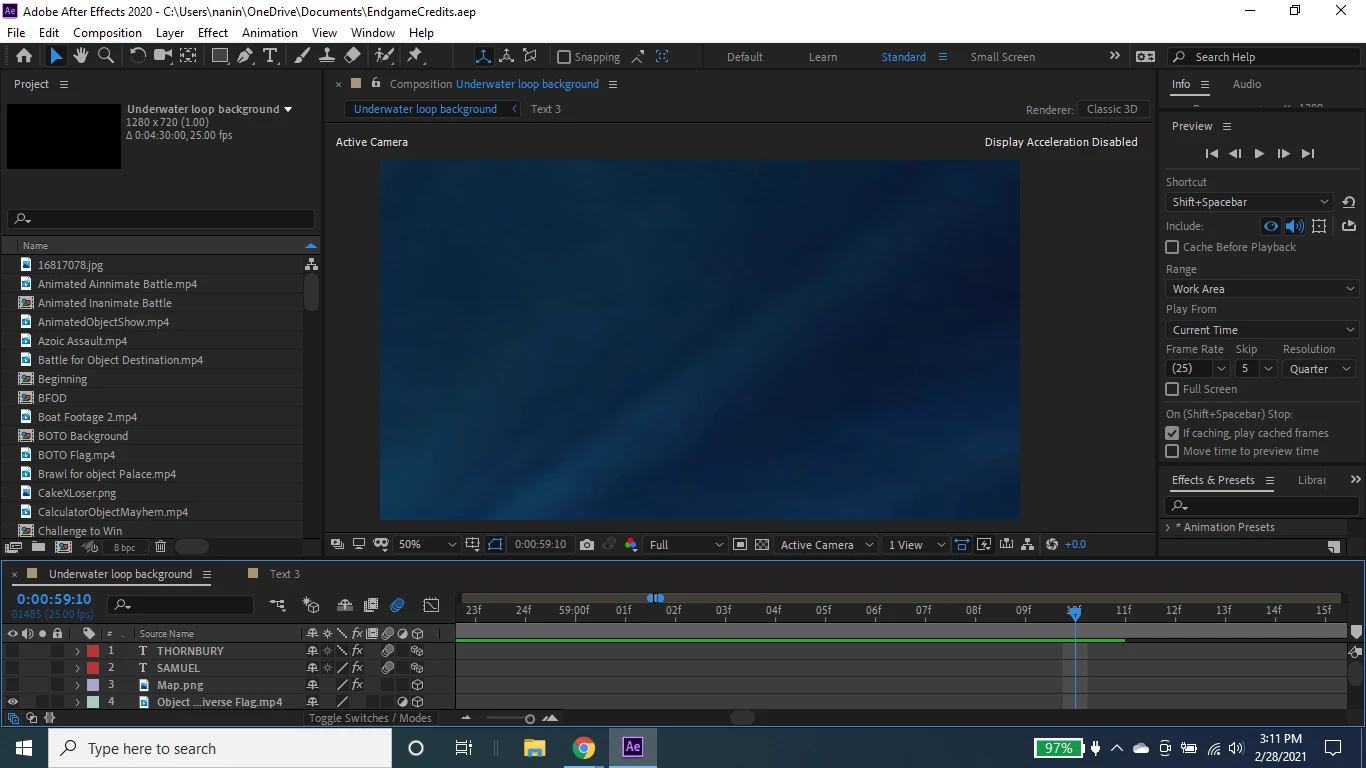
I want to speed up the process of previewing my composition by skipping 2 frames. However, my composition is bypassing the skip frame settings and is proceeding to make all frames instead of skipping 1 over another. How can I apply my settings? Why are my skip frame settings not working and applying to my composition preview?


Screenshot:


This topic has been closed for replies.
Correct answer Ali Jaber

Then switch to "spacebar" in that dropdown menu and modify the settings!

3 replies

Community Expert
February 28, 2021

You are modifying settings for "Shift + spacebar", do you use that shortcut when previewing?

Participant
March 1, 2021

No, I use space.

Ali JaberCommunity ExpertCorrect answer
Community Expert
March 1, 2021

Then switch to "spacebar" in that dropdown menu and modify the settings!

Community Expert
February 28, 2021

You have to stop the current preview and then start another one before the changes take place. If the frames have already been cached you may have to make a change to the comp or purge memory and cache.

Participating Frequently
February 28, 2021

Hi. Have you tried clearing your cach and memory? Edit>Purge.