



After Effects render-engine CC2017 license issue
After following the instructions on installing After Effects CC render engines with Adobe Creative Cloud | Creative Cloud blog by Adobe I installed AE, launched AE (working just fine) and signed out, placed a blank file 'ae_render_only_node.txt' (yes, I checked the file extension!) in C:\Users\myusername\My Documents. But when launching the AE render engine via the shortcut 'Adobe After Effects Render Engine', a very strange error message window pops up:
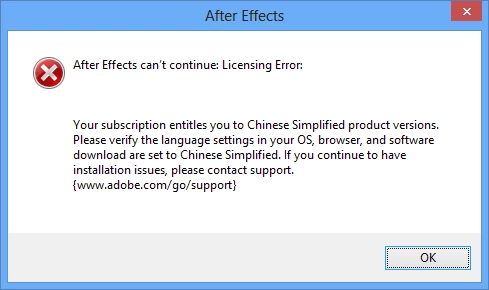
All region settings on my render computer is set to Dutch, AE is in English and runs just fine when I remove the 'ae_render_only_node.txt' file and sign in. I also tried to place the file in C:\Users\Public\Public Documents\Adobe. Still the same error.
The guys from Adobe couldn't solve the problem yet. Any ideas on this?
 AdChoices