
Participating Frequently
April 29, 2022
Question

After Effects Script - Method to access the Render Queue Output to Presets

  • April 29, 2022
  • 1 reply
  • 1355 views

Hi All,


Just as the title suggested, how do I, using script to, access the Render Queue > Output To > Presets (Template) to change to 'Comp Folder and Name'
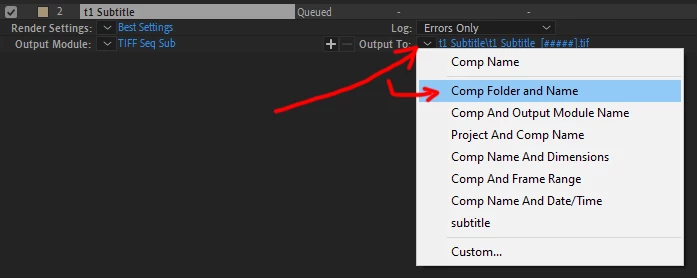
TL:DR

We've been using script for one of our workflow to render out subtitles.


Previously we render them as Quicktime movie, we can add the comp to the render queue then change the output module and redirect the path to where we wanted to without any issues.


Unfortunately, with the new AE ver22.3 update, we have to render the project as image sequences.


We can't find any documentation to access the Output To> Presets,  as a work around we have to create the folder with the script before rendering. We could potentially have empty folders, if later we don't need to render the subtitles anymore. As some of our designers aren't tech-savy, we might end up rendering hundred of frames in an obsure part of the network that we have to move later.


Here's part of the our current script,


var myRQItem = app.project.renderQueue.items.add(thisComp) ;//adding your comp to render queue
   
var d = new Date().getDay();
var dayName = this.dayList[d];
   
var om = myRQItem.outputModule(1);

var newPath = this.outputPath + "\\" + dayName + "\\" + this.storyTitle;
Folder(newPath).create();
var pathString = newPath + "\\" + this.storyTitle + "_" + this.compTitle + "_[#####]" ;

om.applyTemplate("TIFF Seq Sub");
om.file = new File (pathString);


Ideally, we would like to change the Output To preset to "Comp Folder and Name" by script and not create a folder before rendering.


Thanks!  

This topic has been closed for replies.

1 reply

jordanwade33
Participant
June 19, 2023

I just figured this out for myself, so I thought I would share with the group. The basics of the new method to set paths are documented here, but that doesn't say anything about using templates. To use templates we use "File Template" instead of "File Name" and copy the contents of the template from the "Custom" editor.


For example, to use "Comp Folder and Name" preset using the example in ae-scripting.docsforadobe.dev:

var om1 = app.project.renderQueue.item(1).outputModule(1);
var file_name = File.decode( om1.file.name ); // Name contains special character, space?
var new_dir = new Folder( "~/new_output" );
var new_path = new_dir.fsName;

var new_data = {
  "Output File Info": {
      "Base Path": new_path,
      "File Template": "[compName]/[compName].[fileExtension]"
  }
};

om1.setSettings( new_data );
Participant
July 3, 2023

so if I wanted to have it set the file name to be "comp name/current frame/filetype.  How would I do that.  I was doing it like this

// Create a file for the render with a specified file name and path
var myFile = new File(outputPathText.text + comp.name);
 
// Add the tempComp to the render queue and specify the output module and file
var theRender = app.project.renderQueue.items.add(comp);
theRender.outputModules[1].applyTemplate("PNG Sequence");
theRender.outputModules[1].file = myFile;
 
but in AE 2023 that isnt setting the file format correctly, was going nuts trying to figure it out.