Participant
December 4, 2020
Answered

After Effects- start up message about plugins

  • December 4, 2020
  • 2 replies
  • 496 views

Hello, This is my first post here and I think my issue is not unique. 

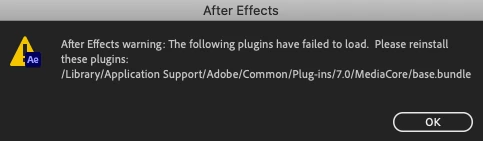
When booting up AE I get this message.(image attached) The app opens and I can work but I don't know what the issue is.

I uninstalled and reinstalled AE and I get the same message. Where do I find the base.bundle???

Suggestions??

Thanks 

S Willets
This topic has been closed for replies.
Correct answer ToolfarmJP

I have not found base.bundle in my After Effects (v17.5.1) although you do not mention the version of After Effects you have installed. Would you move base.bundle to another folder and run After Effects? You can ignore it if you do not get any error messages at startup.

2 replies

Mylenium
Legend
December 5, 2020

A .bundle is a code package component, not a real file. Without any actual system info and other details we can't tell you why it isn't loading. Start by reinstalling the program with sufficient user privileges. Perhaps simply the file permissions are messed up. otherwise this could point to an incompatible processor on an older Mac or issues with hardware acceleration functions as used by some CoDecs.


Mylenium

ToolfarmJP
Community Expert
ToolfarmJPCommunity ExpertCorrect answer
Community Expert
December 5, 2020

I have not found base.bundle in my After Effects (v17.5.1) although you do not mention the version of After Effects you have installed. Would you move base.bundle to another folder and run After Effects? You can ignore it if you do not get any error messages at startup.