Participating Frequently
October 13, 2016
Question

After Effects Taking too much time and big file size in rendering with Quicktime

  • October 13, 2016
  • 2 replies
  • 21344 views

Hi All,

I am using After Effects CC 2015.3 release and my laptop configuration is i5 5th generation, 8 GB Ram. I have Quicktime Player, version of 7.7.6!! I have no GPU configuration. I am trying to render 9 seconds video in Quicktime(.mov). It's taking too long and around size of 1.7 GB. Till yesterday it was working really well, but don't know what happened.

Here are the screenshots of my composition settings:
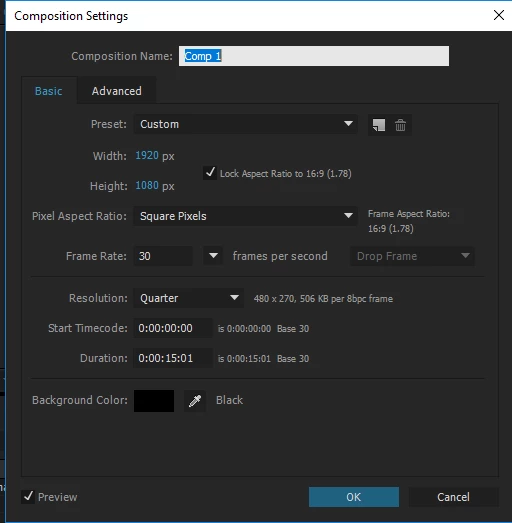
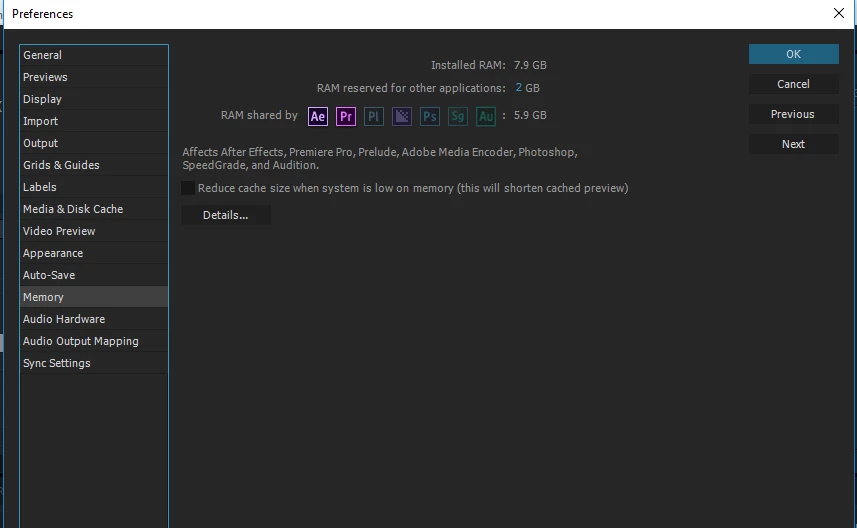
I have tried almost everything. I have also updated Quicktime Player as well. There is no issue with Quicktime Player. I think the issue is with frames. Because it's rendering each frame. Here is the screenshot of my Preferences Panel.
Can anyone help me? Any help would be greatly appreciated. Thanks!

This topic has been closed for replies.

2 replies

Community Expert
October 13, 2016

You use the presets in the Adobe Media Encoder. It's in the links.

Participating Frequently
October 13, 2016

Thank you so much Rick. I really appreciate. Will check again.

Roei Tzoref
Legend
October 13, 2016
I am trying to render 9 seconds video in Quicktime(.mov). It's taking too long and around size of 1.7 GB.

what is too long? 1.7gb for a 10 second video sounds about right for a lossless compression. have you read this?

FAQ: Why is my output file huge, and why doesn't it play back smoothly in a media player?

FAQ: What is the best format for rendering and exporting from After Effects?

Participating Frequently
October 13, 2016

Hello mate,

Thanks for your quick reply. I have already seen it and tried it but doesn't work. Too long means it's taking too much time. Thanks!

Roei Tzoref
Legend
October 13, 2016
it but doesn't work

what doesn't work? what are you expecting exactly? if it's smaller file sizes - you file size is o.k and suits a lossless compression, if it's the render time - that really depends on what you got inside your composition.

you should provide:

1. workflow details (what are your output settings fo the render)

2. a clear view of your composition (screenshot of your Ae interface)

3. specify in numbers what is happening ("it takes 3 hours to render 10 seconds" for example) so we can know what is the problem

4. you should specify the Ae version and OS exact numbers in any case where this could be a compatibility or bug issue

so far we have not demonstrated that there's even a problem.