

After Effects to AME Doesn't Match Source
I forgot that you can't export to mp4 directly from AE anymore (using Adobe Media Encoder to create H.264, MPEG-2, and WMV videos from After Effects | Creative Cloud blog by Adobe ), so I did the second method mentioned on that page.
Steps
I clicked on Composition > Add To Adobe Media Encoder Queue. An instance of AME launched and the composition appeared in the render queue as expected.
Problem
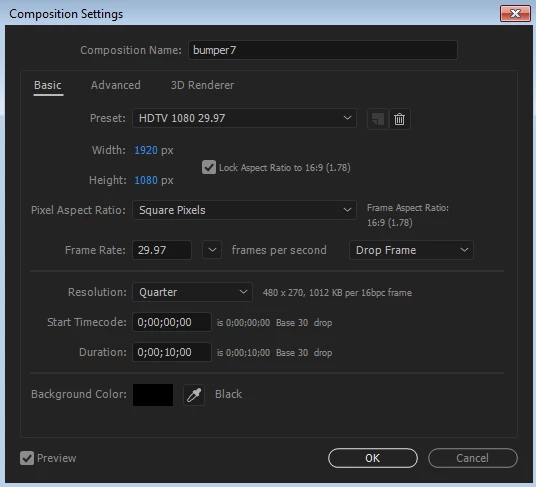
The project settings didn't match. The original AE project is 1920x1080.
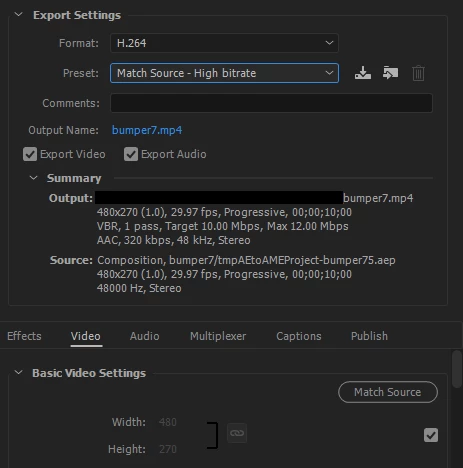
But it loaded into AME's queue as 480x270.
Workaround
I exported the project to avi from AE instead, then opened the avi file in AME's render queue, and everything matched.
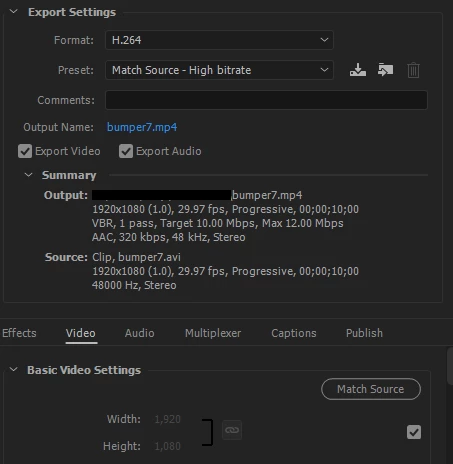
Any thoughts on why the project doesn't match the source when I try to add the comp to AME directly? I'm using the latest version of AE CC 2017 (14.0.1.5) and AME CC 2017. Hopefully I'm just overlooking a simple setting here.
The only thing I can think of is that AME matched the resolution in the project settings (which was Quarter 480x270 as seen in the first screenshot), but I don't recall that being the normal behavior. If it is, I'll change the resolution when I have a moment and see if it loads into AME properly.
 AdChoices