
After Effects unusable after restart prior to color management settings change
Hi,
After Effects seems to break my project files.
Expected behavior:
I open a project and the first preview frame renders.
Actual B behavior:
under certain circumstances After Effects doesn't render any preview frames after opening a project (the preview area just becomes grey). I can scroll through the timeline, change effect settings etc. but no frames are rendered and the program has 0% CPU usage. It crashes on exit.
This behavior can be reproduced this way (I can only reproduce it using BorisFX Sapphire plugins, but I suspect it's an AE issue):
See attachments for demonstration.
1. Launch After Effects
2. Configure Project Settings -> Color like this:
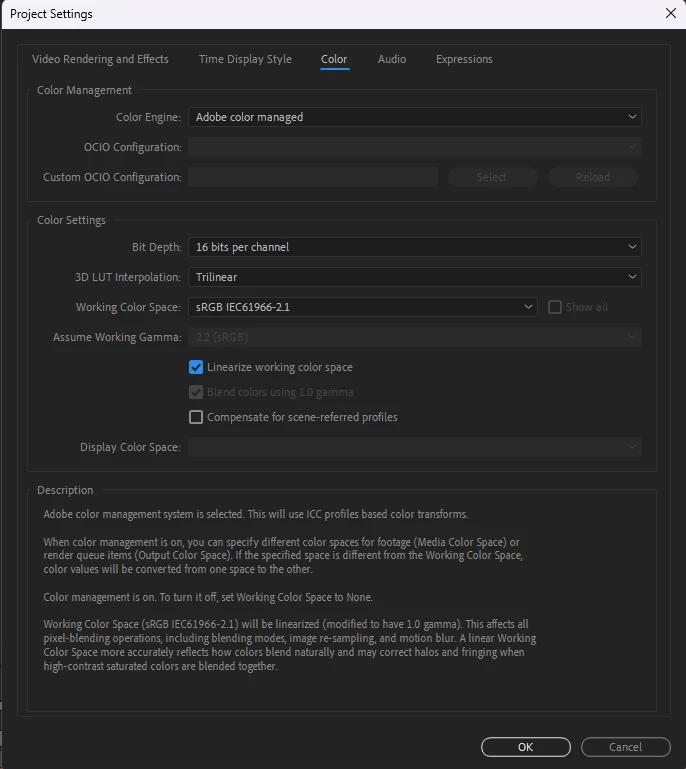
(3. Restart After Effects)
4. Create a new composition with 3 layers: 2 solids, 1 adjustment layer above them
5. Put S_DistortRGB onto the adjustment layer and set "Lens" and "Matte from Layer" to the layer directly below the adj. layer. Change both from "Source" to "Effects & Masks".
6. Put e.g. Fractal Noise on the layer that is used by "Lens" and "Matte from Layer", hide the layer
7. Put a shape layer with a rectangle (or an image) below the adjustment layer.
8. Save the project, restart After Effects and open the project
9. Set "Linearize working color space" in Project Settings -> Color to false
10. Save the project, restart After Effects and reopen the project
As a result, I can't work on some of my old projects (I might have changed the Color settings somewhere along the way which triggered the described behavior).
If I reopen the project after it has been "corrupted", disable AE's GPU Acceleration and restart AE again, AE does render frames again, but it is significantly slower.
I already tried to...
...update / reinstall GPU drivers
...switch between Studio / Game Ready driver
...reinstall (other versions of) After Effects
...reinstall (other versions of) Sapphire Plugins
...reinstall Windows
...reset AE preferences
I was able to reproduce the bug using following software versions:
After Effects 24.4.1 (Build 2)
BorisFX Sapphire 2024.51
Windows 11 23H2
NVIDIA Studio Driver 555.99
Hardware:
CPU: AMD Ryzen 9 5900X
GPU: NVIDIA GeForce RTX 3070
RAM: 64GB (52GB assigned to AE)
Does anyone have an idea on how to solve this issue?


 AdChoices