



Felipe375224913qmt
Inspiring
Feb 10, 2026 11:56 PM UTC
Answered

After Effects version 26.0 freezes when I use the 3D camera with two views.

After Effects version 26.0 freezes when I use the 3D camera with two views.
 

After Effects version 26.0 freezes when I use the 3D camera with two views.

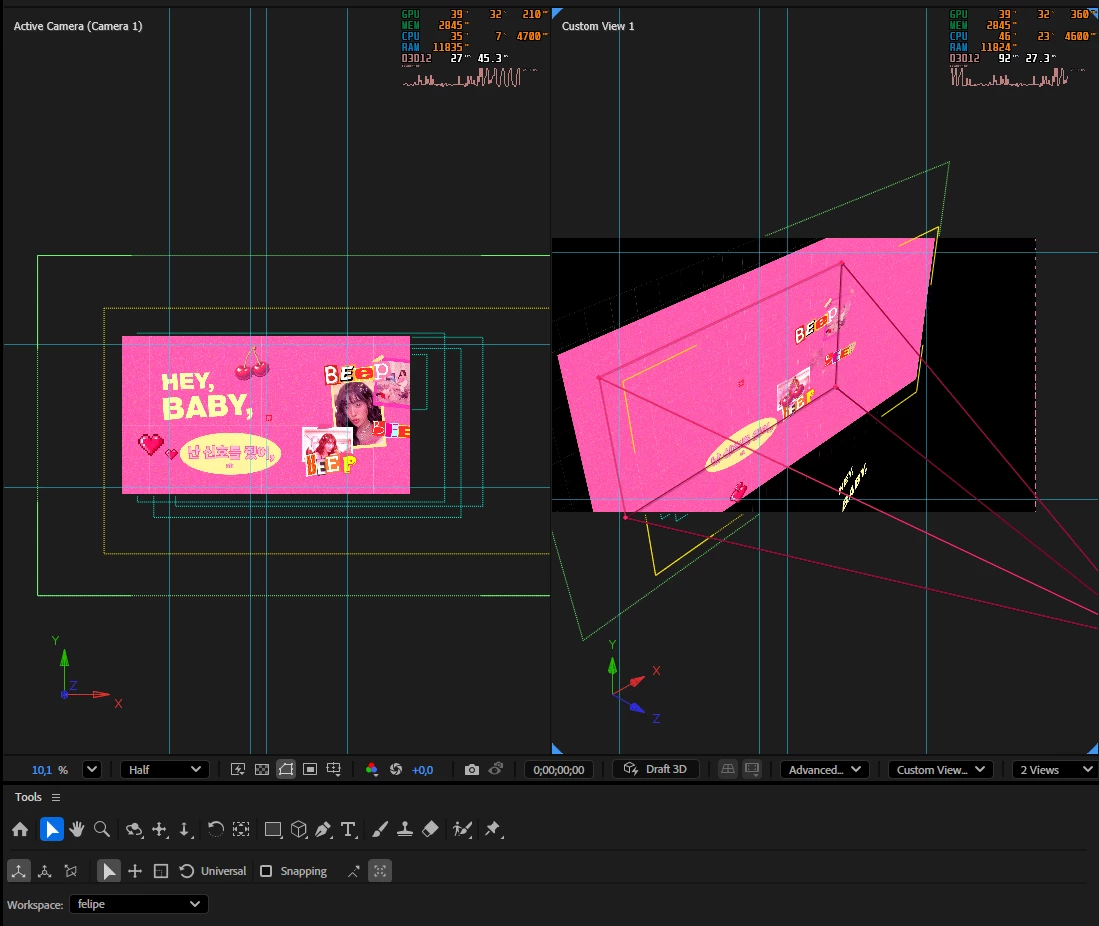
Since version 24, After Effects has had this problem of freezing the view on two screens when using the 3D camera. At first, I thought it was due to my PC's configuration, but I recently upgraded it and the problem persists. I've reset the After Effects settings several times and it's still the same. Now, something strange is that if I work with only one view, After Effects doesn't freeze, so I only work with that single view currently.

 Screenshot of the frozen screen:

PC specifications:

Operating system: Microsoft Windows 11 Pro version 10.0.26200
CPU: Intel Core i7-10700F 2.90GHz
RAM: 32 GB DDR4
Graphics card: Nvidia GeForce RTX 4070
SSD: 1.8 TB

Felipe375224913qmt
Felipe375224913qmtCorrect answer
Inspiring
May 11, 2026 9:50 PM UTC

Hello everyone, I finally discovered what the problem was. One thing I forgot to mention is that I also use my PC for gaming, so I had installed GPU monitoring software to check my GPU and CPU temperatures. The programs were RivaTuner and MSI Afterburner.

What do they do? Here’s the Gemini explanation that helped me figure it out: the issue happens because RivaTuner tries to “inject” its overlay code (the one that displays temperature and FPS) into any process using the GPU. Since After Effects relies heavily on hardware acceleration, it interprets this “injection” as instability, which can cause crashes, random shutdowns, or visual glitches.

Why does this happen?

These programs:

  • hook directly into the GPU
  • intercept graphics API calls (DirectX / Vulkan / OpenGL)
  • inject overlays into the rendering pipeline

In Adobe After Effects 26, this breaks D3D12.

How did I figure it out?

I formatted my computer and installed After Effects again, and I noticed the issue was completely gone. But as I started reinstalling all my usual programs, the problem came back. That’s when I realized it wasn’t a GPU driver issue. I started uninstalling programs one by one until After Effects worked normally again. During this whole process, I think I formatted my PC twice.

Thank you all so much for taking the time to help me troubleshoot this problem.

14 replies

Felipe375224913qmt
Felipe375224913qmtAuthorCorrect answer
Inspiring
May 11, 2026 9:50 PM UTC

Hello everyone, I finally discovered what the problem was. One thing I forgot to mention is that I also use my PC for gaming, so I had installed GPU monitoring software to check my GPU and CPU temperatures. The programs were RivaTuner and MSI Afterburner.

What do they do? Here’s the Gemini explanation that helped me figure it out: the issue happens because RivaTuner tries to “inject” its overlay code (the one that displays temperature and FPS) into any process using the GPU. Since After Effects relies heavily on hardware acceleration, it interprets this “injection” as instability, which can cause crashes, random shutdowns, or visual glitches.

Why does this happen?

These programs:

  • hook directly into the GPU
  • intercept graphics API calls (DirectX / Vulkan / OpenGL)
  • inject overlays into the rendering pipeline

In Adobe After Effects 26, this breaks D3D12.

How did I figure it out?

I formatted my computer and installed After Effects again, and I noticed the issue was completely gone. But as I started reinstalling all my usual programs, the problem came back. That’s when I realized it wasn’t a GPU driver issue. I started uninstalling programs one by one until After Effects worked normally again. During this whole process, I think I formatted my PC twice.

Thank you all so much for taking the time to help me troubleshoot this problem.

Translate
Nishu Kushwaha
Community Manager
Community Manager
Jul 23, 2026 9:05 PM UTC

Glad to hear that you found the fix. Thanks for sharing the solution with the community.

Feel free to reach out if there are any other questions. Moving this thread from Bugs to Questions.


Thanks,

Nishu

Translate
David.Arbor
Community Manager
Community Manager
Apr 13, 2026 2:31 PM UTC

Hi ​@Felipe375224913qmt , sorry to hear this is happening. Can you please post a full UI screen recording showing what’s freezing?  A screenshot doesn’t really tell the whole story.

Also, we recently fixed a bug with multiple views. Can you please install the latest version of the AE Public Beta? If the issue doesn’t occur there but it does occur in the release version, that means our fix also took care of your situation. If not, a screen recording could be very helpful.


Thanks,

-David, After Effects Engineering Team 

Translate
Felipe375224913qmt
Inspiring
Apr 13, 2026 7:38 PM UTC

Hi ​@Felipe375224913qmt , sorry to hear this is happening. Can you please post a full UI screen recording showing what’s freezing?  A screenshot doesn’t really tell the whole story.

Also, we recently fixed a bug with multiple views. Can you please install the latest version of the AE Public Beta? If the issue doesn’t occur there but it does occur in the release version, that means our fix also took care of your situation. If not, a screen recording could be very helpful.


Thanks,

-David, After Effects Engineering Team 


Hello! Here is the screen recording.

Link to screen recording.

Translate
David.Arbor
Community Manager
Community Manager
Apr 13, 2026 9:33 PM UTC

Thank you so much for that! A couple things:

  1. Would you be able to collect that project and send it to me privately?
  2. I noticed you the Crash Reporter appeared a couple times, but you didn’t submit it. Those are incredibly helpful for us as they will send a lot of useful data to our system specific to your crash. Could you please trigger the crash again, check the box to send your email, and DM me the email address you used? I should be able to find the report and send it to one of our developers to figure out what’s going on.

But if we can also have the fully collected project so we can reproduce the issue on our end, that would be fantastic.


Thanks!

-David, After Effects Engineering Team

Translate
nishu_kush
Legend
Feb 13, 2026 3:53 PM UTC

Hi there,


Sorry to hear about the issue. Is it reproducible every time, or is it random? Are there any error messages? Are you using any third-party plug-ins? Can you try running After Effects in Safe Mode with third-party plug-ins disabled and see if that helps?

Let us know how it goes.


Thanks,

Nishu

Translate
Felipe375224913qmt
Inspiring
Mar 29, 2026 7:14 PM UTC

Is it reproducible every time, or is it random?
R: Yes, it always happens when both views are active.

 Are you using any third-party plug-ins?
R: Yes, I use some plugins.

 Can you try running After Effects in Safe Mode with third-party plug-ins disabled and see if that helps?
R: Here's a screenshot in safe mode without the plugins; the problem persists.


Translate
Nishu Kushwaha
Community Manager
Community Manager
Mar 30, 2026 6:44 PM UTC

That’s really strange! I haven’t seen this issue before. It could be specific to your setup. What happens after the freeze? Does it crash or start working again after some time? Is it specific to 2 Views only? What happens if you use 4 views? Since you’re having this issue for some time, I am guessing it is not project-specific. But is there anything common that you’ve been using in all your projects? For example, any media or any effects?

Let me know.


Thanks,

Nishu

Translate
Community Expert
Feb 11, 2026 1:51 AM UTC

What is the resolution of your media?

Translate
Felipe375224913qmt
Inspiring
Feb 11, 2026 2:48 AM UTC

1920x1080

Translate