Participant
October 19, 2019
Question

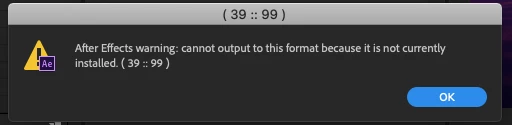
After Effects Warning: Cannot Output to this format because it is not currently installed (33 :: 99)

  • October 19, 2019
  • 4 replies
  • 6339 views

Currently using Adobe After Effects CC 2018 on my Macbook (Running 10.15 Catalina).


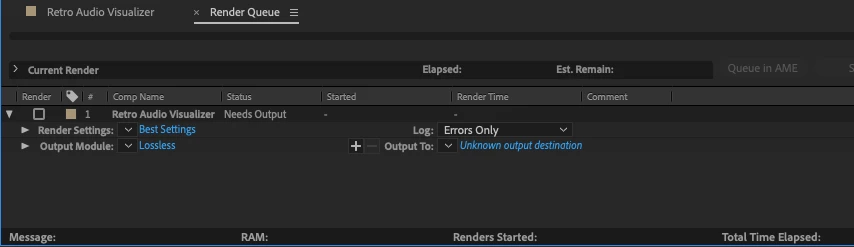
When I attempt to Pre-render or Export, my format types are missing which leaves me with this error message and I am unable to export. I would like to export directly out of AE as lossless to H.264 if possible.  


Any help is appreciated! 


This topic has been closed for replies.

4 replies

Participant
December 20, 2019

Having the same problem since installing catalina. Has anyone found a solution to this yet??

chloem83957156
Participant
September 12, 2020

have you found any solution?

iftekharuli22702854
Participant
October 24, 2019

I have the same problem.. did you find a solution? 

Community Expert
October 20, 2019

You said, " I would like to export directly out of AE as lossless to H.264 if possible."


H.264 is an interframe MPEG codec that not only compresses color and averages motion between I, P, and B frames (read up Inter frame - Wikipedia). It cannot be lossless. It is very good at doing what it is designed for: Delivering an acceptable quality playback using a low data rate and small file size to consumers. It is a terrible production format. It should only be the very last step in your production process, not the first. 


If you want to deliver the highest quality content to a consumer then you should be using the Adobe Media Encoder or some other compressor to render your final edit to a standard delivery format like H.264, but unless you are an expert, you should not mess with the presets. About the only safe thing you can change without a thorough understanding of the process is to enable multi-pass rendering, but the advantage of MP rendering is almost always lost if you use any of the standard streaming services (YouTube, Vimeo) to show your work because they will re-compress your work using their own software to prepare it for distribution. The farther your work is from their recommendations the bigger the hammer they use to re-compress your work. Follow the guidelines and use H.264 for distribution and you will be as happy as you can be with the result.

liamr0yAuthor
Participant
October 19, 2019

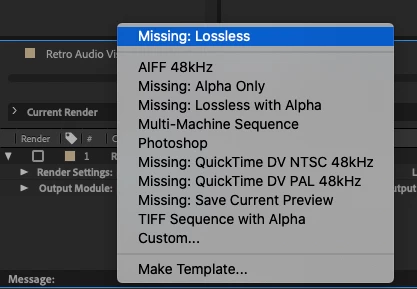
Update these are my options when I open the output module and do the format dropdown


Andrew Yoole
Inspiring
October 20, 2019

For some reason the legacy Quicktime codecs are not present in your system.  I'm currently running After Effects CC 2019 on a Catalina OS and have the following QT codecs available in the Render Queue:


 You could try installing the legacy Quicktime Player 7.  It won't run in Catalina, but perhaps it installs the legacy codecs.

https://support.apple.com/kb/dl923?locale=en_AU


Also upgrade to CC 2019.


You cannot export to H264 directly from After Effects, you must send it to Adobe Media Encoder to do so.  H264 is not, and cannot be, lossless. It's a heavy compression codec designed for final delivery of content.  If you wish to output truly lossless content you should use an uncompressed Quicktime codec, and expect huge file sizes.  The Lossless Output Module in After Effects uses the Quicktime Animation codec at 100% quality, so you can also use this if you are able to reactivate the legacy Quicktime codecs in your machine.