


Participating Frequently
May 10, 2018 3:48 PM UTC
Answered

After Effects will not render camera 1 view

I created a comp with 3d layers and Im trying to animate a camera moving around the environment I have created. I have only 1 camera and its the top layer of my comp. Everytime I try to render, it only renders the static "active camera" view. How can I specify which camera view to render? Using AE CC ver 15.0 Thanks!
Rick GerardCorrect answer
Community Expert
May 10, 2018 5:02 PM UTC

Your Active Camera is Camera 1 but you have Camera 1 turned off so you are not looking at the Active Camera.

Switch to Active Camera and switch the eyeball on and off for the camera and you'll see the problem. AE will look at any camera you select but it will only render the active camera. These are basic AE principals you should be familiar with. You should never judge your comp by looking at a specific camera view because you can get caught by this behavior. It's not a bug. It's been that way since AE had cameras.

11 replies

CEJLLC
Known Participant
Dec 8, 2018 12:25 AM UTC

@Rick Gerard-Thanks for the explanation.  This is also true for placing the comp with the camera movement in a new comp.  You lose the movement in the new comp. That what I was looking for a solution to.

Translate
Participant
Oct 18, 2023 9:02 AM UTC

I'm baffled.  I have Camera 1 doing exactly what I want it to do.  There is NO Active Camera except in the viewer.  I cannot turn it on or off.  Camera 1's eyeball is ON, but all I get rendered is the Active Camera I cannot control.

Translate
Participant
Sep 14, 2025 12:35 PM UTC

It’s true, I have the same problem. I’ve been an AE user for 24 years, and things like this still occur, reminding me how trashy AE is.

Translate
Participating Frequently
May 10, 2018 4:53 PM UTC

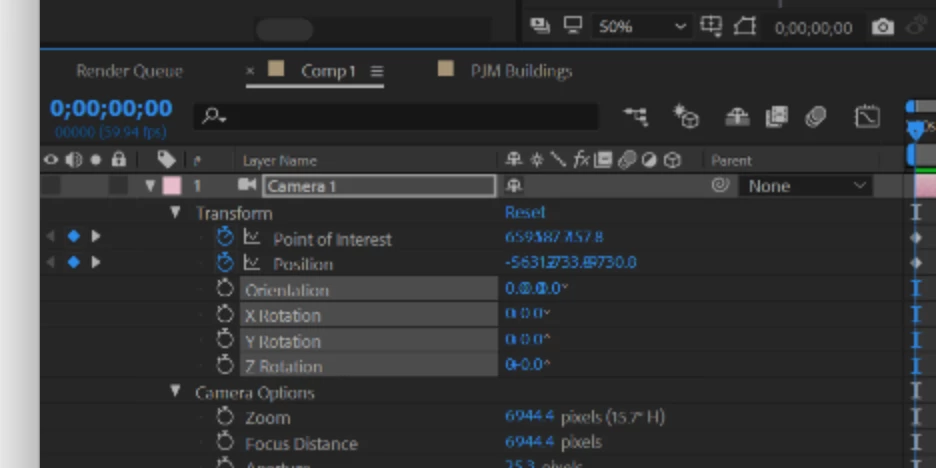
Expanded layer panel with properties

Translate
Rick GerardCommunity ExpertCorrect answer
Community Expert
May 10, 2018 5:02 PM UTC

Your Active Camera is Camera 1 but you have Camera 1 turned off so you are not looking at the Active Camera.

Switch to Active Camera and switch the eyeball on and off for the camera and you'll see the problem. AE will look at any camera you select but it will only render the active camera. These are basic AE principals you should be familiar with. You should never judge your comp by looking at a specific camera view because you can get caught by this behavior. It's not a bug. It's been that way since AE had cameras.

Translate
Participating Frequently
May 10, 2018 5:15 PM UTC

ha! that was it. Thanks. I was thrown off by the camera movement showing up in RAM preview

Translate
Community Expert
May 10, 2018 4:01 PM UTC

Only the Active Camera will render. The active camera is the camera with the lowest layer number (top camera) in a comp with multiple cameras. Unless needed for setting up a camera move you should always be using the Active Camera view. The Top, Left, etc., views will not render. Only Active Camera.

This is clearly explained in the documentation. There has never been an option to render anything but the Active camera.

Make sure you don't have a second camera in the comp. Reveal all shy layers. If you are still confused post a screenshot of your comp with all modified properties of the layers giving you problems revealed. Just select them, press U twice and PrintScreen and then paste to the forum.

Translate
Participating Frequently
May 10, 2018 4:49 PM UTC

seems like I have 2 view despite only having 1 camera in my layers.

Translate
Mylenium
Legend
May 10, 2018 3:58 PM UTC

The active camera is your render cam and if you defined a camera layer, it will be used for rendering. If there's a specific issue, you will have to provide screenshots of the timeline and comp window with al lthe good stuff visible so people can diagnose your issue.

Mylenium

Translate
Participating Frequently
May 10, 2018 4:47 PM UTC

here is a screen shot!

as you can see, i only have one camera. as soon as I hit hit render from the render que the image switches from camera 1 view to "active camera" view. 

in render que

when i hit render.

thanks in advance

Translate