
Legend
March 11, 2017
Question

After Effects won't let me zoom out /move further out to add more objects in the distance

  • March 11, 2017
  • 1 reply
  • 6026 views

This relates to the composition I asked about previously (where the issue was the trees not quite being in contact with the ground/grass).

Anyway, the person I was doing the anim for hasn't mentioned anything about the above issue, but is saying there aren't enough trees and asking for "many, many... trees" (there were 32 in the orignal composition and the main one had to be high res because the camera starts off very close to it (that tree is about 8K x 12K).

So I need to make it look like there are "many, many" more trees in the distance (preferably with a distance apart from the others so they appear like they belong to many different apple farms). I could either do it by adding 1 image per tree in the distance or having each image contain multiple trees in the distance or both (1 image per tree could be used for the closer ones so perspective is better).

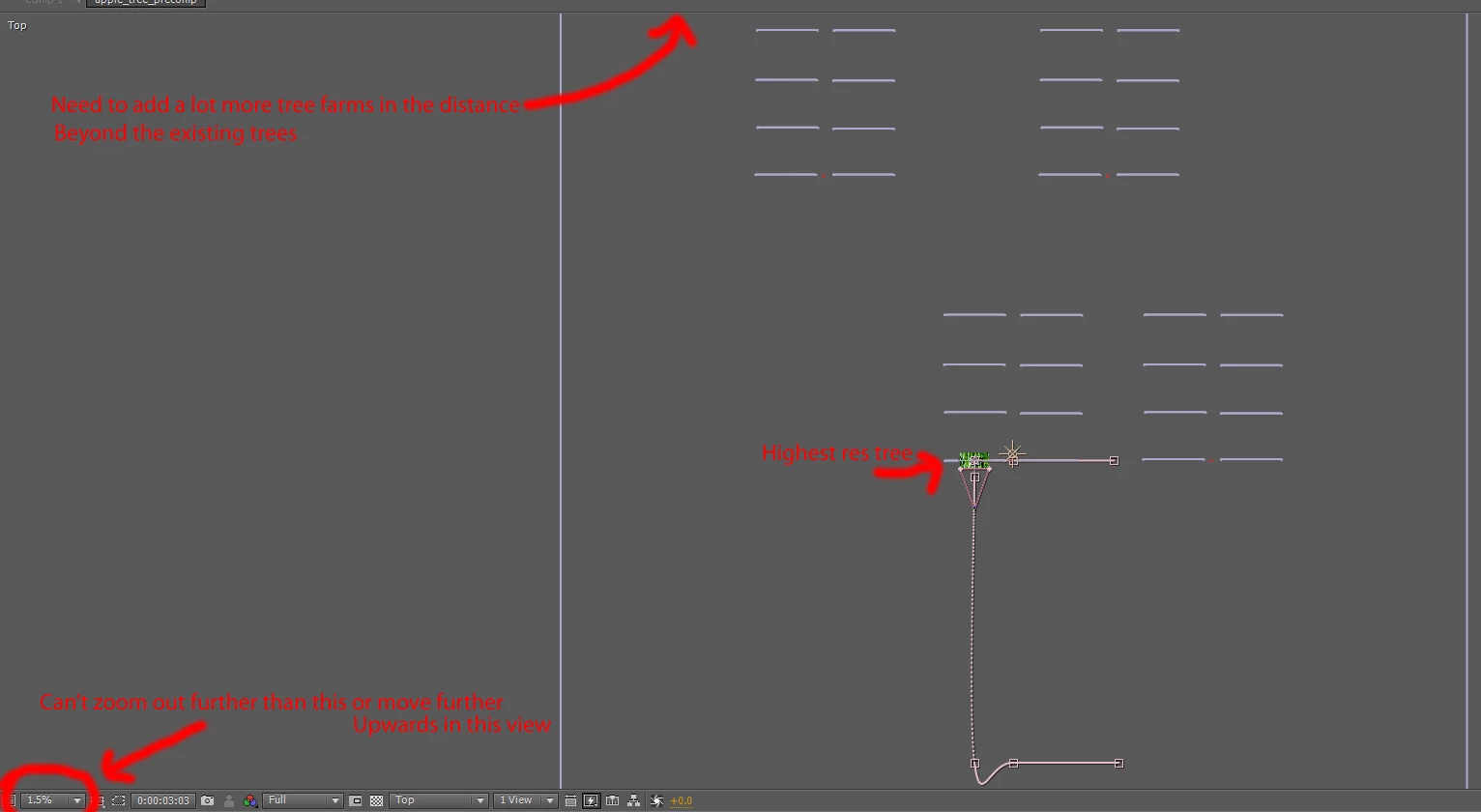
The problem is, After Effects (CS5.5) won't let me zoom out to a percentage lower than 1.5% (in the Top view) to place additional trees at a reasonable distance futher away - or use the hand tool to move to a further place around the z axis. Is there some way around this? Do I need to scale everything in the composition down or something like that?

Here is a picture of the top view showing the issue (note: there is a sky image plane beyond these trees but for some reason it won't show it in the top view even though I try to zoom out/move to show it):
This topic has been closed for replies.

1 reply

Mylenium
Legend
March 12, 2017

Your workflow makes no sense, I'm afraid. There's no reason to go batty over high-res trees and placing them geometrically exact. you would simply build multiple comps and stack them together, including cross-fading between different resolution versions. After all, you can use collapser transformations, can you not? If that's still not working for you, then it may simply be too complex and you may have to use a genuine 3D program.

Mylenium

A.I.1Author
Legend
March 12, 2017

I needed the high res tree because it starts off showing just one apple on the tree in close-up before pulling back to reveal it's part of an apple tree, which is part of an apple farm, and that there are lots and lots of apple farms. If I started off with a low res tree (for the main tree) there the apple close-up looked really bad (in the 1080p video). I have done pre-composing (but I'm not totally sure how best to do it to get it looking reasonably correct with the camera moves). I don't know right know how I'd do it in a genuine 3d program like Blender - and I need to do it quite quickly and for that I'm sure After Effects will be best. Just placing them (groups of them with a null) seemed like a reasonable-ish way to do it and the scale and everything would be accurate with the camera moves.

I don't know why After Effects isn't letting me look further into the Z (eg. to place additional objects), I mean the sky image is placed further back (edit: I've just reloaded the comp and it's showing the sky plane where it didn't before as shown in the screenshot - but it still doesn't let me zoom/move back as described). I suppose I could place additional trees/groups of trees in the main view and just enter manual values instead of using the top view (but that's going to be harder to ensure they're positioned accurately). It seems like the limitation is in the top view (probably some of the other views too). If there was some setting that could be edited to say "allow zooms of <1.5%" or moving further back than whatever it currently is that would be good.

edit: Yes I probably could do it with fading/dissolving from each view - but I thought it would look much better if all done in one camera move, without fades.

edit2: I've added what should hopefully be enough trees in the distance (at various distances) so hopefully he will be happy with that. I might see see if I can add a bit of fog in the background over the distant trees to it looks like there's a lot and you don't really see to clearly the actual number.

I added them using the camera view but it would have been a lot easier/faster to pick up and place groups of them using the top view. It's got to be some sort of bug if the top view won't let me see all objects that are in the composition. Thanks for your help though. I'll probably try to use a better way than mine in future (and if I had to properly show pans over many different farms I'd have to do some sort of fade/dissolve to a different comp for that).

Community Expert
March 12, 2017

You need multiple images of the trees, not one gigantic one that you push into so that you have a pixel perfect apple. It's like doing an earth zoom. You start with a 2X comp size image of the earth from space, match that to a 2X image of part of the earth, match that to a 2X image from 40,000 feet, match that to a 2X image from google earth showing a state, then an image of a city, then an image of a house, then an image of a kid on a bicycle shot from above. You need a bunch of layers. None of them should be much bigger than 2 or 3 x the with of your composition and none of them should be closer to the camera than the zoom value or scaled to more than about 100%. You just need to hide or carefully match the transitions between layers to pull this off.

The problem you were trying to solve required a better understanding of how compositing and pixels work. Success lies in design and the proper preparation of the assets you need to use. It would serve you well to study up on visual effects techniques. There are lots of good books on the subject. Knowing the software (AE) is really the least important part of the process.