
Participant
February 6, 2019
Question

Ai files changing colour when importing into AE

  • February 6, 2019
  • 2 replies
  • 859 views

When I’m importing Ai files from Illustrator to AE the colours shift a lot. The RGB values change.

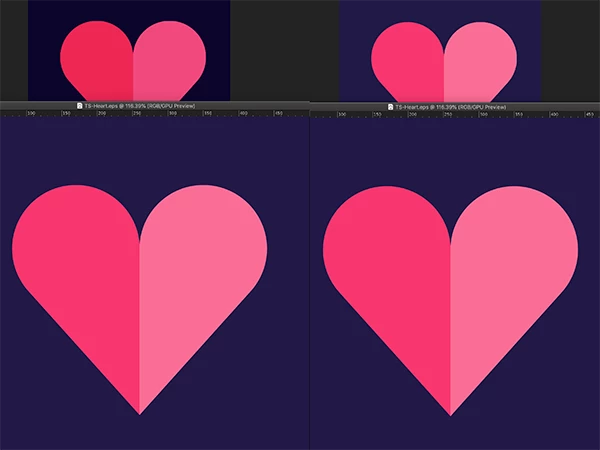
Colour management is on and I’m using the Apple RGB. Checked the project settings just incase and both the Ai file and the Ae file use the same colour space. But when I import I get the top left images (illustrator image below). As a test I can convert the Ai file shapes and recolour (right pair of images). What am I doing wrong?

Note that I have tried converting the files to different working spaces but I get the same colour-shifting.
    This topic has been closed for replies.

    2 replies

    manal shanableh
    Legend
    February 6, 2019

    make sure that the Ai file is using RGB colors.

    Dave_LaRonde
    Inspiring
    February 6, 2019

    What happens if you use NO color management?

    Participant
    February 6, 2019

    Even more confused now. Tried turning everything off but was still getting weird colour shifts (top left with everything off and the colours are over saturated).

    1. So I uninstalled Bridge. Binned the ACEConfigCache2.lst. Re-installed Bridge and synced my colour space to Europe Gen Pur 3.

    2. Imported Ai file into Ae and then set the working space in Ae to sRGB to match the Ai file – still no look, now darker and saturated.

    3. So I did a couple of tests and exported frames from Ae to PSDs

    4 Ae to PSD using sRGB ≠ the colours match but both still don’t look like the Ai file.

    5. Ae to PSD with colour space turned off = PSD matching colours of the ai file but on screen in Ae looks totally different.