Participant
March 11, 2020
Question

Align keyframes by timeline

  • March 11, 2020
  • 3 replies
  • 10944 views

Hi everyone)

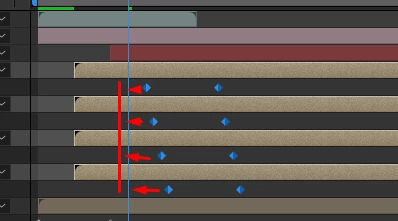
Please help me. How I can align keyframes by timeline on several layers, maybe there is a hotkey?

 

This topic has been closed for replies.

3 replies

Community Expert
March 11, 2020

Move the CTI to the new location.


Select the keyframes you want to move on the layer and Ctrl/Cmnd + X to cut them then immediately Ctrl/Cmnd + v to paste them to the new location.


It should be noted that any easing or editing of the dynamics using the graph editor may have to be redone.


The other method, make sure snapping is turned on or hold down the Shift key when dragging and keyframes will snap to the time indicator (CTI).

Participant
March 19, 2020

Hello, thank you very much. Your answer was useful for me)

Roland Kahlenberg
Legend
March 11, 2020

Martin is right - there is no shortcut key. Most pros use a script called Rift - https://aescripts.com/rift/

Very Advanced After Effects Training | Adaptive & Responsive Toolkits | Intelligent Design Assets (IDAs) | MoGraph Design System DEV
Participant
April 6, 2022

wonderfull tool, many thanks mate! cheers

Martin_Ritter
Legend
March 11, 2020

No hot key, you'll have to drag them one by one or use a script to do so.

I prefer "KEYboard" for basic keyframe tasks such this one.


*Martin