Enova_Contenidos
Participating Frequently
January 28, 2020
Question

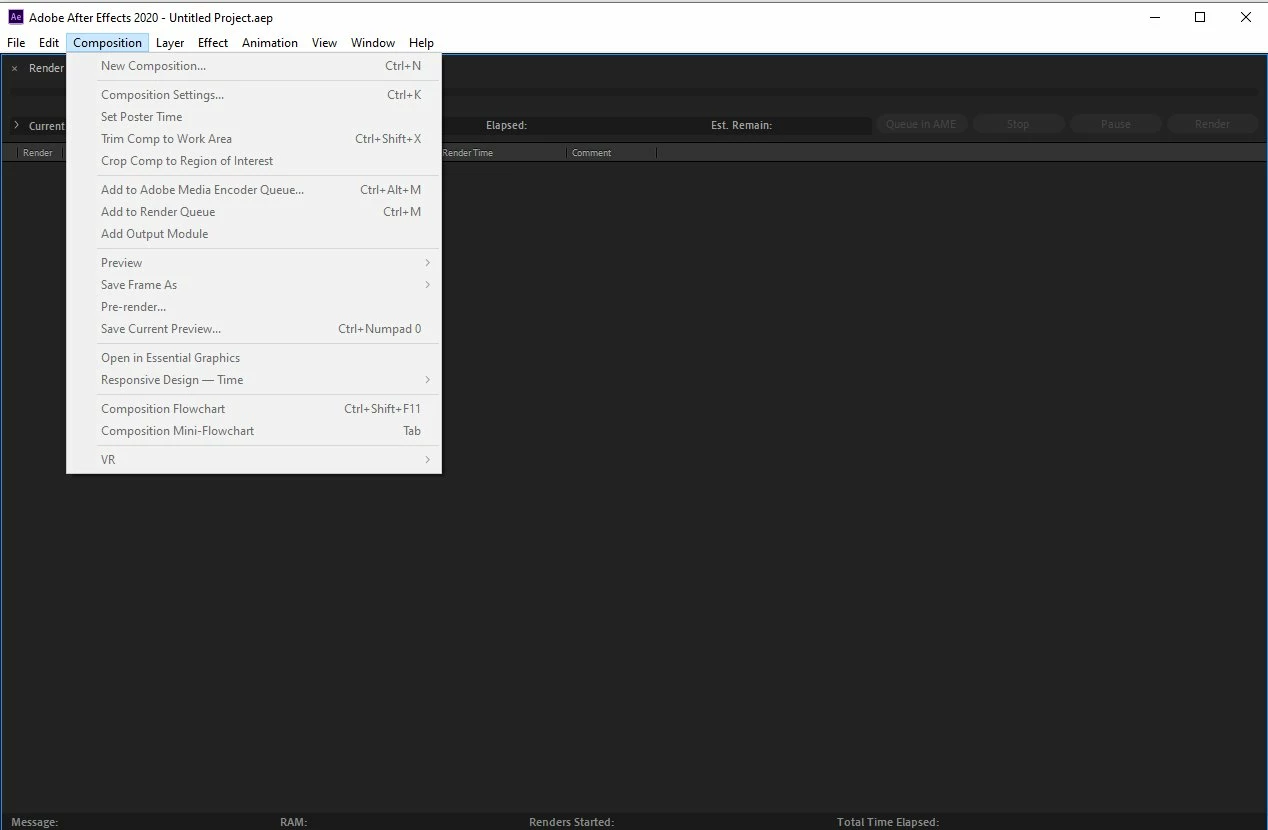
All panels disappeared, all menu options disabled. Reinstall does not fix .

  • January 28, 2020
  • 6 replies
  • 2517 views

This topic has been closed for replies.

6 replies

Participant
May 4, 2021

This worked for me. I deleted the file and everything went back to normal.


https://helpx.adobe.com/after-effects/kb/accidental-render-node-launch-ae.html

Participant
March 14, 2020

Did you solve the problem?
I'm having the same problem

andriyk13487082
Participant
July 23, 2020

Managet to fix it by deleting all AE folders in all Document and AppData folders

C:\Users\Public\Documents\Adobe\After Effects CC 2019
C:\Users\"User Name"\Documents\Adobe\After Effects CC 2019
C:\Users\"User Name"\AppData\Roaming\Adobe\After Effects\

Community Expert
January 28, 2020

This sounds suspiciously like you have opened the Render Only app instead of the normal after effects program file. Make sure you are running the right app.

Enova_Contenidos
Participating Frequently
January 29, 2020

I already checked it and the app that is running is Adobe After Effects 2020


Enova_Contenidos
Participating Frequently
February 19, 2020

Nothing works 😞

I have reinstalled AE 2020, AE 2019 and AE 2018 and the same thing always happens.


Every time I run Adobe After Effects, it opens as if I were running Adobe After Effects Render Engine.


I tried to run the file AfterFX.exe directly from C:\Program Files\Adobe\Adobe After Effects 2020\Support Files , but it didn't work either


Any ideas or solutions?

Community Expert
January 28, 2020

Try clicking in x to close Render Queue panel.


Byron.
Enova_Contenidos
Participating Frequently
January 28, 2020

None of them work!

Only the menus, but all options appear in gray

nishu_kush
Legend
January 28, 2020

Hi there,


Thanks for reaching out. Could you try resetting the preference manually? Follow the steps below:

  • Press Window+R to open the Run command box and type "appdata".
  • Go to Roaming > Adobe > After Effects and rename the 17.0 to old17.0.
  • Go to Documents > Adobe and rename After Effects 2020 to oldAfter Effects 2020.

It will reset the settings to default.

Let us know if it helps.


Thanks,

Nishu

Enova_Contenidos
Participating Frequently
January 28, 2020

Thanks for the support but unfortunately renaming the folders did not solve the problem.
After Effetcs continues showing all the menu options disabled and no active windows.

Community Expert
January 28, 2020

Menu Window / Workspace / Reset "Xxxxxx" to Saved Layout. Or press the square bracket key on the right side of the P on the physical keyboard.


Byron.
Enova_Contenidos
Participating Frequently
January 28, 2020

All the menu options are disabled and press Ctrl + Alt + Shift to reset the preferences or press the square bracket does not work either.