Participant
March 17, 2017
Answered

Allowed RAM Usage limited

  • March 17, 2017
  • 5 replies
  • 4658 views

Hi. I just discovered after getting that 2 "främaes preview error" and a very short RAM preview when it's working that After Effects it's limited to use only 1 GB of memory from the 32 GB i have. I tried many solutions found on forums, uninstalled the AVG antivirus but didn't manage to fix it.

Actually it's a problem since it reserve for other applications  0 RAM.

Anyone could help me with this?

Installed RAM: 31.88 GBCurrent RAM Usage: 0.81 GBAllowed RAM Usage: 1.00 GB

Process IDApplication NameMin Needed MemoryMax Usable MemoryMax Allowed MemoryCurrent MemoryCurrent Priority
2132After Effects1.0031.881.000.811 - High

This topic has been closed for replies.
Correct answer Szalam

You have 0 GB of RAM reserved for other applications? That's going to cause lots of issues. AE even uses system resources outside of itself to do stuff. The recommended practice is to allocate about a quarter of your RAM to other applications.

5 replies

Participant
June 8, 2022

I know it has been a while since this post but I was having the very same issue: 1Gb Max Allowed Memory while I've got 128Gb available:


I couldn't find anything that would help me sold this issue. This post was the only one that seems to be as close to it but still, I don't think anyone answered the question, even thought it says "Correct Answer".


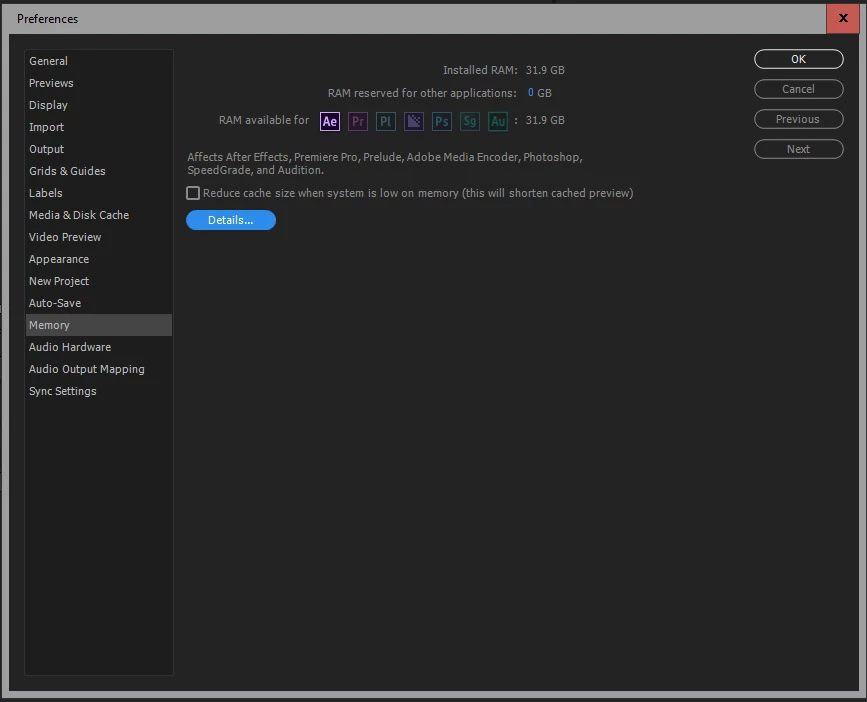
That said, I thought I'd share my solution. I simply tried pressing Ctrl+Alt+Shift while starting After Effects, which resets all the settings to default and that seemed to fix it.

See screeshot below, taken straight after restarting AE with Crtl+Alt+Shift pressed:


This is my very first time on the forum but I hope this may be helpful for someone in the future.


Thank you.

Participant
January 5, 2024

thank you this solved it

Szalam
Community Expert
SzalamCommunity ExpertCorrect answer
Community Expert
March 21, 2017

You have 0 GB of RAM reserved for other applications? That's going to cause lots of issues. AE even uses system resources outside of itself to do stuff. The recommended practice is to allocate about a quarter of your RAM to other applications.

Participating Frequently
October 12, 2021

I also have this issue.  Windows 11, GeForce 3080 32 GB RAM etc.  AE is limited to 1 GB RAM.  Tried purging cache, no luck.  Restart not helping.  Have left 5 GB RAM to other apps.

demo_modeAuthor
Participant
March 18, 2017

Hi.

So i have an 8 core, Intel i7-4770 @3.40GHz, 32 GB RAM, 2 SSD, one for the system 120 GB and one for work 500 GB.

the videocard is NVIDIA GeFOrce GTX 960.

Actually i realized this preview problem since i installed AE CC 2017, i don't remember having this problem before.

Of, i purged the memory and disk cache, i moved the cache folders on the bigger disk, i've uninstalled the antivirus (learning that it worked in a similar case posted on creativecow forum), i cleaned 20 GB on the system disk

I guess something is forcing AE to use just 1 GB. In Device Manager i don't have any conflict.

The Task Manager shows me this after a maximum RAM preview i can get. Obvious it doesn't use all the RAM i have.

i forgot to mention it's a Windows 10 system.

Mylenium
Legend
March 18, 2017

Sounds odd, though I'm inclined to think that some driver is pigeonholing you into this situation. Just to test I would create a secondary user profile and see what the differences are. Also try booting up in safe mode. Disabling devices and CoDecs in the device manager and then re-enabling them may also help to track down the culprit.

Mylenium

Mylenium
Legend
March 18, 2017

Without exact system info and details about otehr running processes nobody can tell you much.

Mylenium

P.M.B
Legend
March 18, 2017

What are the many suggested solutions you've tried?

~Gutterfish