


Inspiring
March 19, 2024
Answered

Already enable permissions

  • March 19, 2024
  • 1 reply
  • 356 views

Yesterday I tried to open my After Effects file as usual.

First the file didn't wanted to open because it threw me: bad format or not readable error.

Auto-save copies didn't work for anything, keeps throwing me same error.

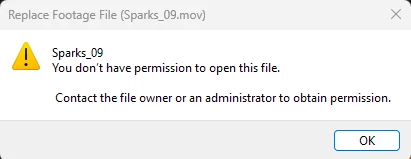
Somehow I was able to get the file open, but then I tried to reload all missing footage, "you don't have permission to open this file" pops out.
I went thru all folders, even what they suggest here: https://helpx.adobe.com/mx/x-productkb/multi/preferences-folder-read-only-error.html


...but message keeps popping out... I don't know if the file is already corrupt.


Please let me know if there's something else I could try...

This topic has been closed for replies.
Correct answer nishu_kush

Is it happening to multiple files? Where is this file saved - in an internal, external, or shared drive? What happens if you copy the media to a different location (your desktop) and try to import? Does that work?

Let us know, we're here to help.

Note: Moving this thread from Bugs to Discussions for troubleshooting.


Thanks,

Nishu

1 reply

nishu_kush
nishu_kushCorrect answer
Legend
March 19, 2024

Is it happening to multiple files? Where is this file saved - in an internal, external, or shared drive? What happens if you copy the media to a different location (your desktop) and try to import? Does that work?

Let us know, we're here to help.

Note: Moving this thread from Bugs to Discussions for troubleshooting.


Thanks,

Nishu

lumpandroAuthor
Inspiring
March 19, 2024

Thanks for the tip, I moved all the files into a new external hard drive (it was on an other eHD), I was really upset if that didn't work either. All set up! Thanks again for the advice.