MahaB82A
April 10, 2026
Answered

Anchor point & Tracking tool

  • April 10, 2026
  • 1 reply
  • 34 views

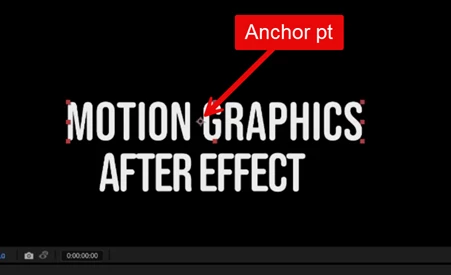
Anchor point of text “MOTION GRAPHICS” is at the center.  When I adjust the tracking, text adjusts from LHS. What is the reason? In my view text also should be adjust from centre. Video also attached


    Correct answer thepixelsmith

    Change the text alignment to Center and it should work the way you want.

    Anchor Pt. relates to layer level transform properties (scale, rotation, position). Text properties like Leading, Tracking and Kerning exist below the layer level and are not affected by the layer’s anchor point. It kind of ha to be that way to allow for exact placement/control/animation of layers.


    1 reply

    thepixelsmith
    Community Expert
    thepixelsmithCommunity ExpertCorrect answer
    Community Expert
    April 10, 2026

    Change the text alignment to Center and it should work the way you want.

    Anchor Pt. relates to layer level transform properties (scale, rotation, position). Text properties like Leading, Tracking and Kerning exist below the layer level and are not affected by the layer’s anchor point. It kind of ha to be that way to allow for exact placement/control/animation of layers.


    MahaB82A
    MahaB82AAuthor
    April 10, 2026

    **Thanks**