
Inspiring
January 30, 2023
解決済み

Anchor points when animating 'Size' property of shape

  • January 30, 2023
  • 返信数 2.
  • 355 ビュー

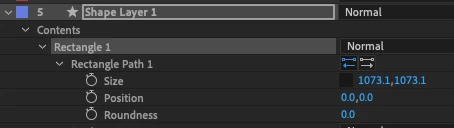
I've set the anchor point to the top-right corner of my rectangle shape, but when I modify the 'Size' property, it resizes it from the centre.


I'm guessing this is due to the 'Position' property.


Is there an easy way of getting it to resize based on the anchor point instead?
 

このトピックへの返信は締め切られました。
解決に役立った回答 Mylenium

It's simply how parametric rectangle paths work. You could compensate it with a simple expression or convert to a spline-based shape. Expression for property as follows:


rSize=thisLayer.property("Rectangle 1").property("Rectangle Path 1").property("Size");


X=-rSize[0]*0.5;

Y=-rSize[1]*0.5;


[X,Y]


Mylenium

返信数 2

Participant
June 21, 2023

Go directly under the “size” attribute and alt-click “Position.” Pickwhip that to Size, and type /2 to divide it in half. That’ll set the anchor point in the top-left corner. From there, go to your layer’s transform properties (NOT the shape transform properties), and alt-click “anchor point”

Mylenium
Mylenium解決!
Legend
January 30, 2023

It's simply how parametric rectangle paths work. You could compensate it with a simple expression or convert to a spline-based shape. Expression for property as follows:


rSize=thisLayer.property("Rectangle 1").property("Rectangle Path 1").property("Size");


X=-rSize[0]*0.5;

Y=-rSize[1]*0.5;


[X,Y]


Mylenium