Check the visible columns in your Timeline. You have to have either the Switches or the Modes column visible. You can do that if you click either of the first two icons at the bottom left corner of the Timeline. The first one looks like three little squares stacked up and the second looks like an intersecting circle and square. The third looks like this: {} and it will reveal the in, out, duration, and stretch columns.
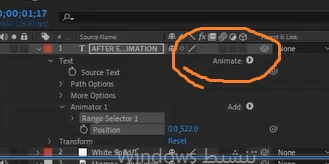
The Animate menu will only appear on a text layer. On a shape layer, you will see "Add" instead of "Animate." No other source layers have options.

 AdChoices