

Elyse Da Silva
Inspiring
March 5, 2026
Answered

Animated Trim Path Help with Null

  • March 5, 2026
  • 1 reply
  • 39 views

I’m working on animating a chart to go on my company’s homepage and followed this tutorial

to help me achieve the look I want. 


The red line (trim path) is moving left, which is the direction I want it to go, but for some reason the null is moving the opposite direction when I adjust the slider control. I’ve attached a screenshot of my work so you can see the expression I used to achieve this. 

I need the null object to be aligned to the right side of the trim path line so I can eventually add a gradient color that would be track matted over the red line. 

Happy to provide more insight if needed, but am hoping for an answer! This is definitely user error :) 
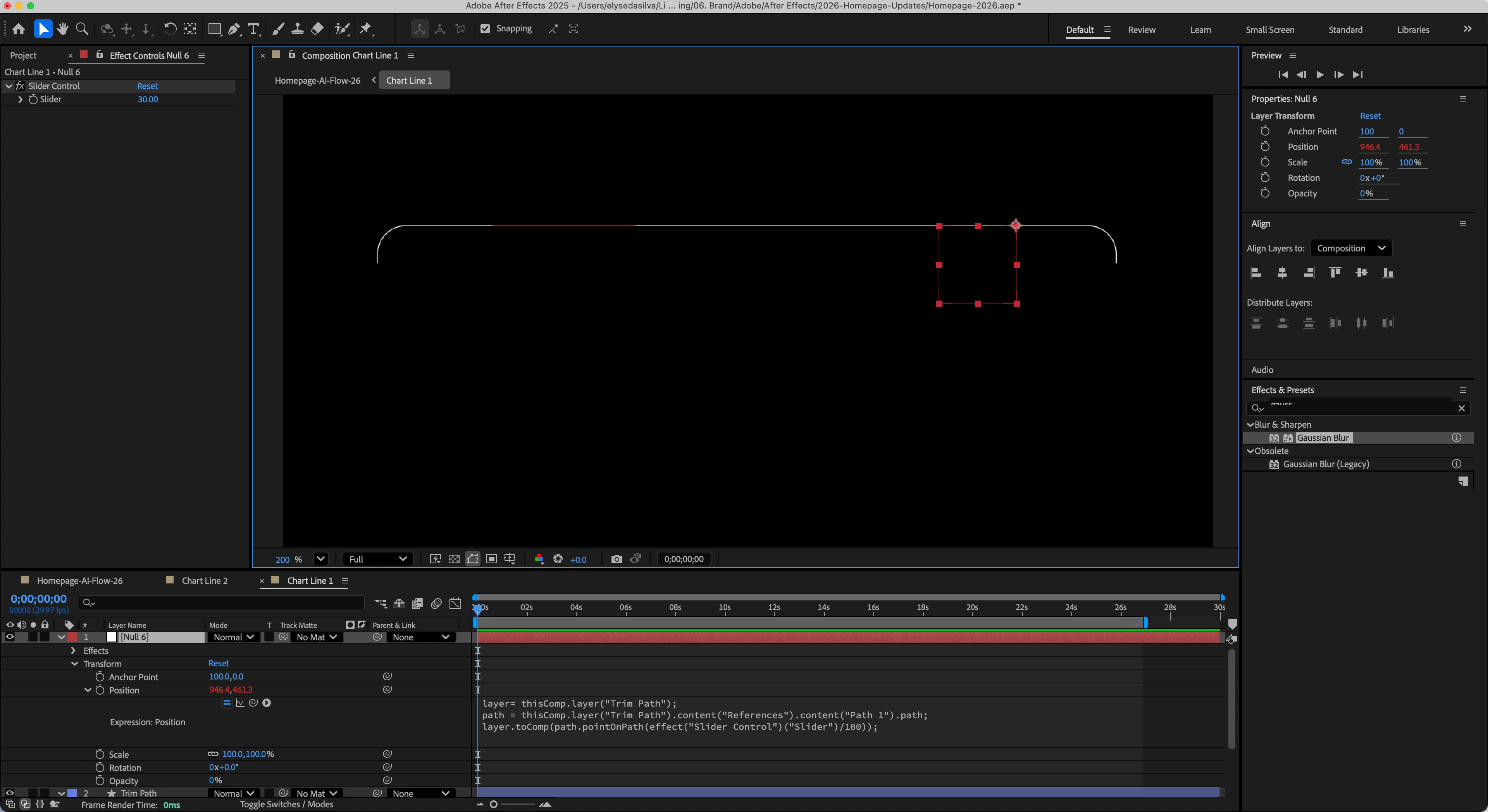
Red Trim Path moves from left to right, but null object moves from right to left


Correct answer Elyse Da Silva

For anyone who may come looking for answers on this or a similar problem -- I will say this: I use the Overlord extension so I can easily push my vectors from AI into AE. I highly recommend this tool. 

Now, when you are creating your art, be cognizant of the direction you want this animation to happen. I had initially drawn the line in illustrator from right to left, which was causing the issues for me when I wanted to animate my trim path from left to right 

I redrew the line in illustrator from left to right, re-pushed to AE, and now my animation is working perfectly. 

I’m sure there are many ways to fix this problem, but for me this was the easiest. I hope it’s helpful to others running into a similar issue.

1 reply

Elyse Da Silva
Elyse Da SilvaAuthorCorrect answer
Inspiring
March 5, 2026

For anyone who may come looking for answers on this or a similar problem -- I will say this: I use the Overlord extension so I can easily push my vectors from AI into AE. I highly recommend this tool. 

Now, when you are creating your art, be cognizant of the direction you want this animation to happen. I had initially drawn the line in illustrator from right to left, which was causing the issues for me when I wanted to animate my trim path from left to right 

I redrew the line in illustrator from left to right, re-pushed to AE, and now my animation is working perfectly. 

I’m sure there are many ways to fix this problem, but for me this was the easiest. I hope it’s helpful to others running into a similar issue.