


animating consistent speed between varying distances in ae
Hi!
My problem seems a bit complicated, and i'm not sure there even is a solution for what i'm trying to do, but i thought i'd give it a shot and ask.
I'm currently working on an animation showing the route deviation of a tram line for the duration of a construction site. I have mapped the route in illustrator and exported layers to use in after effects.
The tramline i want to show is on its own layer and i am using a mask on that layer to "uncover" the line bit by bit. So far i have just been unmasking one station of the route at a time, setting one keyframe per second.
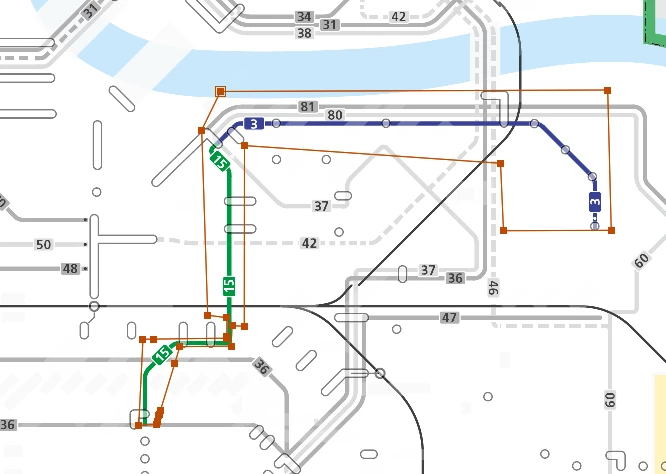
This screenshot shows the tram line i am uncovering and the mask-outline in red:
and here is a screenshot of my keyframes:
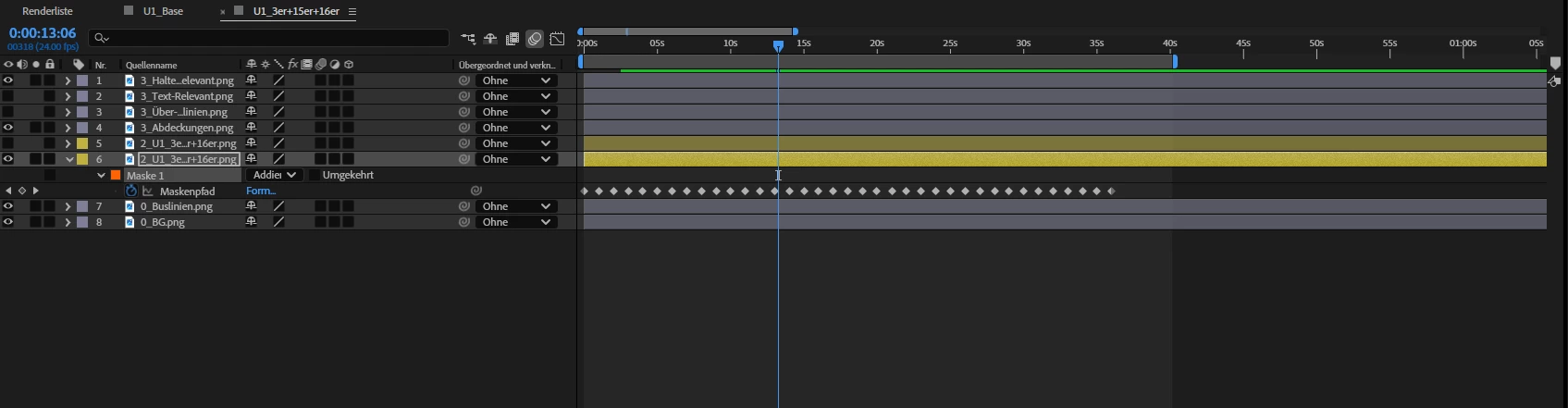
Like i said i've just placed them one second apart so far, because it's easiest that way, so i could focus on animating the mask path.
Of course now, because the distances between the stations on the map are vairable, this means the speed of the line uncovering looks faster or slower, depending on how much the mask has to move within one second.
I would like the speed to look more consistent, since a tram in real life doesn't travel faster or slower based on the distance to the next station. But if i manually move the keyframes one by one on the timeline to make the speed look sort of constistent, i will take ages to finish this (especially because i have more than one tram line to do)
Now my question:
Is there a quicker way i can take these keyframes and space them out to make the visual speed of the line more consistent?
or is there an entirely other method i could do this animation that makes more sense for what i'm trying to do?
infos: I'm working on a hp elitebook with windows 11, adobe after effects 2025
 AdChoices